How HTTPS Secures Your Connection in a Single Network Round-Trip
Learn how the TLS 1.3 handshake secures HTTPS with ClientHello, ECDHE, certificates, 1-RTT setup, and 0-RTT replay risks.
Why this matters
Every time you type https:// in your browser, a complex cryptographic negotiation happens before a single byte of your data is transmitted. This negotiation — the TLS handshake — establishes encryption keys, verifies the server’s identity, and protects your connection from eavesdropping, tampering, and impersonation. It happens billions of times per day across the internet.
In TLS 1.2, this handshake required 2 round-trips (2-RTT) before any application data could flow. On a 100ms RTT connection, that’s 200ms of pure handshake overhead before the browser receives even the first byte of HTML. For users on mobile networks with 200ms+ RTT, the handshake alone added 400ms+ of latency to every new connection — enough to noticeably degrade page load time.
TLS 1.3 reduced this to 1-RTT (100ms on the same connection) and introduced 0-RTT resumption for returning visitors (0ms handshake overhead). But these optimizations introduced new failure modes: certificate expiration breaks handshakes silently, cipher suite mismatches between old clients and modern servers create incompatibility, and 0-RTT resumption opens the door to replay attacks.
Understanding the handshake mechanics — and what breaks — is essential for anyone operating production HTTPS services.
My rule of thumb TLS failures are often operational, not cryptographic. Certificate renewal, client compatibility, and safe defaults matter as much as the cipher list.
The mental model
The TLS 1.3 handshake completes in a single round-trip through a carefully choreographed exchange:
Step 1 — ClientHello: The browser sends a ClientHello message containing: supported TLS versions (1.3, 1.2 as fallback), supported cipher suites (e.g., TLS_AES_256_GCM_SHA384, TLS_CHACHA20_POLY1305_SHA256), a key share (the client’s ECDHE public key, typically on curve X25519), a random nonce, and optionally a pre-shared key (PSK) for session resumption.
Step 2 — ServerHello: The server responds with its chosen cipher suite, its own ECDHE key share, and a random nonce. Crucially, in TLS 1.3, the server sends the key share in the ServerHello itself, not in a separate message. This is why TLS 1.3 is 1-RTT instead of 2-RTT — both key shares are exchanged in the first round-trip.
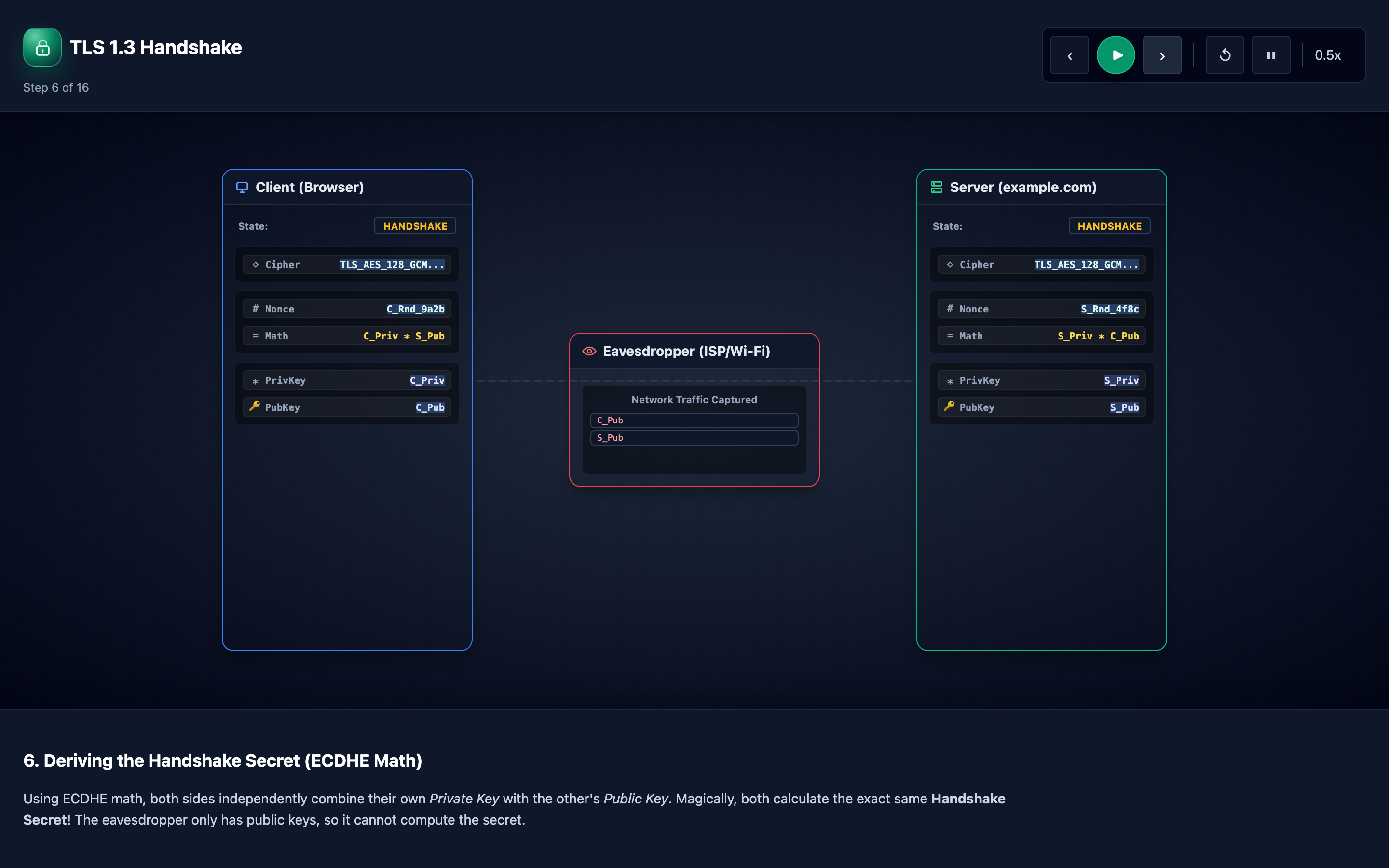
Step 3 — Shared Secret Derivation: Both sides combine their private ECDHE key with the peer’s public key share using Elliptic Curve Diffie-Hellman. The mathematical property of ECDHE ensures both sides compute the same shared secret without it ever crossing the network.
The interactive visualization shows this as puzzle pieces combining. From this shared secret, both sides derive handshake traffic keys, application traffic keys, and finished verification keys using HKDF (HMAC-based Key Derivation Function).
Step 4 — Certificate Verification: The server sends its certificate chain — the server certificate signed by an Intermediate CA, which is in turn signed by a Root CA in the browser’s trust store. The client verifies: the certificate’s domain matches the requested hostname (SNI), the certificate hasn’t expired, the chain is valid up to a trusted root, and the certificate hasn’t been revoked (via OCSP stapling or CRL).
Step 5 — Finished and Encrypted Data: Both sides send Finished messages containing a MAC over the entire handshake transcript, proving neither side’s messages were tampered with. After Finished, all subsequent data uses the derived application traffic keys. The handshake is complete.
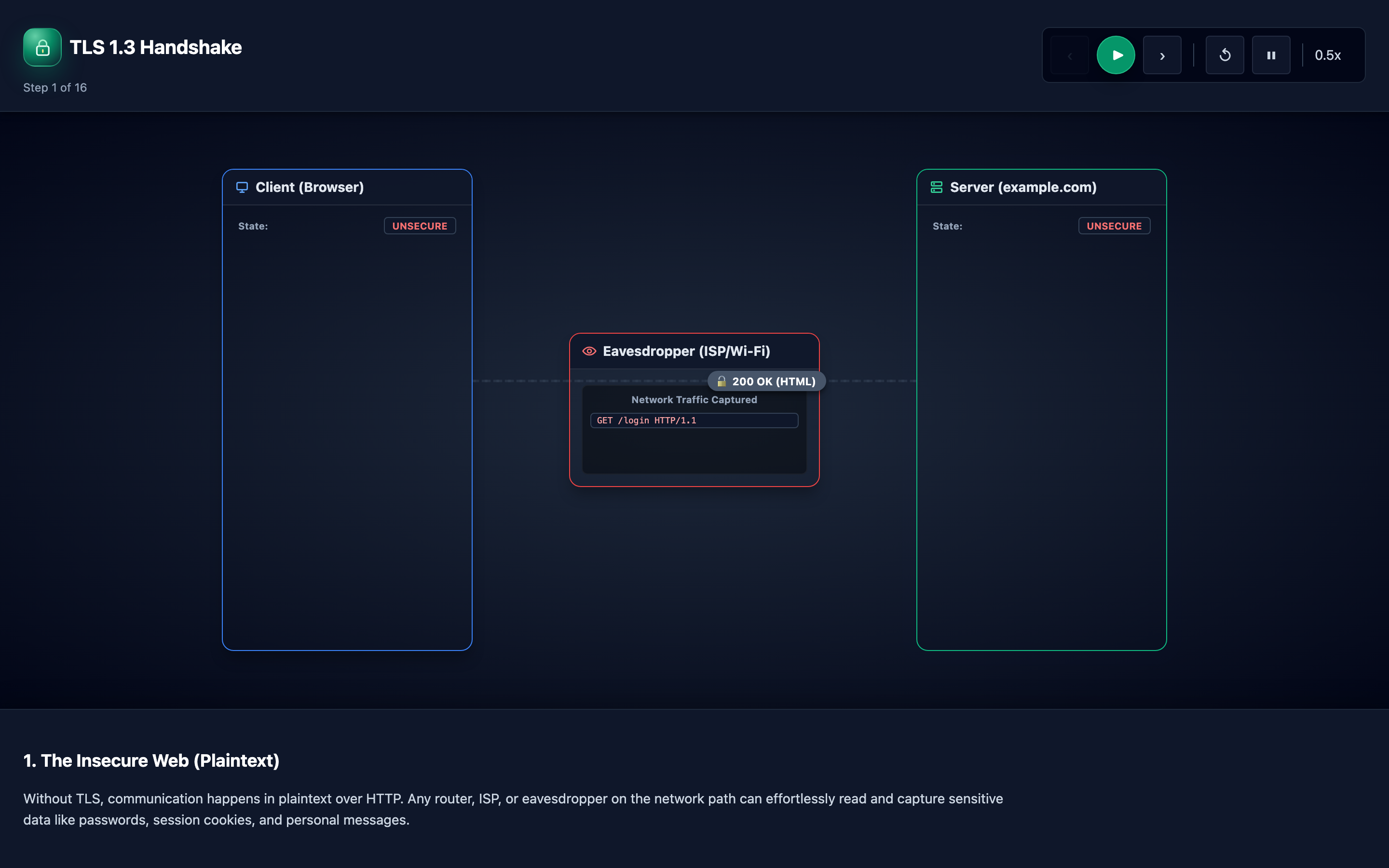
The interactive visualization walks through 16 stages from unencrypted HTTP to fully encrypted HTTPS, including session resumption and downgrade protection.
Decisions that matter
| Parameter | Range / Options | Low End | High End |
|---|---|---|---|
| TLS version | 1.0, 1.1, 1.2, 1.3 | TLS 1.0/1.1 — deprecated, vulnerable to BEAST and POODLE attacks; PCI-DSS non-compliant since 2018 | TLS 1.3 — 1-RTT handshake, 0-RTT resumption, removed all weak ciphers; drops ~1% of very old clients |
| Cipher suites | TLS_AES_128_GCM_SHA256, TLS_AES_256_GCM_SHA384, TLS_CHACHA20_POLY1305_SHA256 | Minimal list (AES-256 only) — maximum security but may exclude devices without hardware AES support (older mobile) | Broad list including AES-128, ChaCha20 — wider compatibility; ChaCha20 is faster on devices without AES-NI |
| Certificate lifetime | 90 days (Let’s Encrypt) – 398 days (max allowed) | Short certificates (90 days) reduce compromise window but require automated renewal; manual renewal risks expiry | Long certificates (398 days) require less frequent renewal but expose you longer if the private key is compromised |
| OCSP stapling | Enabled / Disabled | Disabled — clients must query the CA’s OCSP responder for revocation checks, adding 100–300ms per handshake | Enabled — server includes a signed OCSP response in the handshake, eliminating the client’s extra round-trip |
| Session tickets / 0-RTT | Enabled / Disabled | Disabled — every connection requires a full 1-RTT handshake; no replay risk | Enabled — returning clients can send data in the first packet (0-RTT); vulnerable to replay attacks for non-idempotent requests |
Where it breaks: Certificate Expiration Breaking Handshakes
The failure mode: Your Let’s Encrypt certificate expires on a Tuesday at 3 AM. The certbot renewal cron job has been silently failing for 3 weeks because the DNS challenge can’t resolve (your DNS provider changed their API).
At 3 AM, every new HTTPS connection to your site fails. Browsers show NET::ERR_CERT_DATE_INVALID. Your monitoring (which also uses HTTPS to reach the health endpoint) can’t connect, so it doesn’t alert.
Customers see a full-page security warning and 60% of them leave immediately. You find out at 9 AM when the first support email arrives.
What you will notice:
- Browser shows “Your connection is not private” with error code
NET::ERR_CERT_DATE_INVALID(Chrome) orSEC_ERROR_EXPIRED_CERTIFICATE(Firefox) openssl s_client -connect yoursite.com:443 2>/dev/null | openssl x509 -noout -datesshowsnotAfterin the pastcurl -v https://yoursite.comreturnsSSL certificate problem: certificate has expired- Nginx/Apache error logs show
SSL_do_handshake() failedwithcertificate verify failed— but only if you have mutual TLS; for server certificates, the error is on the client side - Traffic drops to zero in your analytics because no client can complete the TLS handshake
What I would do:
Automate certificate renewal with ACME (Let’s Encrypt) and add monitoring for certificate expiry:
# Certbot auto-renewal (runs twice daily via systemd timer)
certbot renew --deploy-hook "systemctl reload nginx"

# Verify the timer is active
systemctl list-timers | grep certbot
Add a certificate expiry monitor that alerts 30, 14, and 7 days before expiry:
# Prometheus blackbox_exporter configuration
modules:
  https_check:
    prober: http
    timeout: 5s
    http:
      fail_if_ssl: false
      preferred_ip_protocol: "ip4"

# Alert rule: warn 30 days before expiry
- alert: TLSCertExpiringSoon
  expr: probe_ssl_earliest_cert_expiry - time() < 86400 * 30
  labels:
    severity: warning
  annotations:
    summary: "TLS certificate expires in {{ $value | humanizeDuration }}"
For defense-in-depth, set up a secondary monitoring channel (a simple script that checks certificate expiry via openssl and sends an SMS or Slack alert) that doesn’t depend on your primary HTTPS infrastructure:
#!/bin/bash
EXPIRY=$(echo | openssl s_client -connect yoursite.com:443 2>/dev/null | openssl x509 -noout -enddate | cut -d= -f2)
EXPIRY_EPOCH=$(date -d "$EXPIRY" +%s)
NOW_EPOCH=$(date +%s)
DAYS_LEFT=$(( (EXPIRY_EPOCH - NOW_EPOCH) / 86400 ))

if [ $DAYS_LEFT -lt 14 ]; then
  curl -X POST https://hooks.slack.com/services/YOUR/WEBHOOK -d "{\"text\":\"⚠️ TLS cert expires in $DAYS_LEFT days!\"}"
fi
Warning If your monitoring system uses the same HTTPS endpoint it’s monitoring, a certificate expiration will silently disable your alerts. Always set up a secondary monitoring channel that doesn’t depend on the primary infrastructure.
Where it breaks: Cipher Suite Mismatches Between Client and Server
The failure mode: Your security team hardens the nginx configuration to only allow TLS 1.3 with TLS_AES_256_GCM_SHA384. This scores an A+ on SSL Labs.
But 8% of your users run Android 7.0 or older, which doesn’t support TLS 1.3. Their requests fail with ERR_SSL_VERSION_OR_CIPHER_MISMATCH. Your payment processing webhook from a legacy bank also fails because their server sends requests using TLS 1.2 with TLS_RSA_WITH_AES_128_CBC_SHA256 — a cipher not in your allowlist.
You lose $45,000 in unprocessed payments before someone notices.
What you will notice:
- Client-side error:
ERR_SSL_VERSION_OR_CIPHER_MISMATCH(Chrome) orSSL_ERROR_NO_CYPHER_OVERLAP(Firefox) openssl s_client -connect yoursite.com:443 -tls1_2returnsno ciphers availableorhandshake failure- Nginx error log:
SSL_do_handshake() failed (SSL: error:... no shared cipher) - Traffic analytics show a sudden drop from specific browser versions or geographic regions (markets with older device penetration)
- SSL Labs test shows an A+ grade but
Handshake Simulationsection shows failures for older clients
What I would do:
Configure a tiered cipher suite list that prioritizes modern security while maintaining backward compatibility:
# nginx.conf — balanced security + compatibility
ssl_protocols TLSv1.2 TLSv1.3;

ssl_ciphers ECDHE-ECDSA-AES256-GCM-SHA384:ECDHE-RSA-AES256-GCM-SHA384:ECDHE-ECDSA-CHACHA20-POLY1305:ECDHE-RSA-CHACHA20-POLY1305:ECDHE-ECDSA-AES128-GCM-SHA256:ECDHE-RSA-AES128-GCM-SHA256;

ssl_prefer_server_ciphers on;
ssl_conf_command Options PrioritizeChaCha;  # Prefer ChaCha20 for clients without AES-NI
This configuration:
- Allows TLS 1.2 for older clients while preferring 1.3
- Requires ECDHE for forward secrecy (no RSA key exchange)
- Supports both AES-GCM and ChaCha20 (ChaCha20 is faster on mobile devices without hardware AES)
- Excludes CBC-mode ciphers (vulnerable to padding oracle attacks)
Test changes against your actual client population before deploying. Use sslyze to scan your server’s cipher suite configuration:
sslyze --regular yoursite.com
# Review the "Cipher Suite" section for each TLS version
Monitor ssl_handshake_errors_total by TLS version to catch compatibility regressions early.
Where it breaks: 0-RTT Replay Attacks in TLS 1.3
The failure mode: Your site enables TLS 1.3 0-RTT (early data) for performance. A returning user sends a POST request to /api/transfer?amount=500&to=attacker over 0-RTT.
An attacker who recorded the encrypted ClientHello + early data at a network tap replays the exact same bytes to your server. The server accepts the replayed 0-RTT data and processes the transfer a second time. The attacker has duplicated a $500 payment without breaking any encryption — they just replayed the ciphertext.
What you will notice:
- Application logs show duplicate transactions with identical timestamps, session tokens, and amounts — but from different source IPs
- 0-RTT early data is accepted by the server without a full handshake, visible in nginx logs as
$ssl_early_data = 1 - Financial reconciliation detects duplicate transfers that don’t match user-initiated actions
- The attack is invisible to traditional intrusion detection because the replayed bytes are legitimate TLS ciphertext — the content is encrypted
$ssl_early_datavariable in nginx shows early data being accepted on non-idempotent endpoints
What I would do:
Reject 0-RTT for non-idempotent requests. In nginx, use the $ssl_early_data variable to detect early data and reject or defer it for state-changing endpoints:
# nginx.conf — protect non-idempotent endpoints from 0-RTT replay
ssl_early_data on;  # Enable 0-RTT for performance

# Block early data on state-changing endpoints
map $ssl_early_data $reject_early_data {
    1 "1";
    default "";
}

location /api/transfer {
    if ($reject_early_data) {
        return 425;  # 425 Too Early — tells the client to retry after full handshake
    }
    proxy_pass http://backend;
}

# Allow early data for safe GET endpoints
location /api/products {
    proxy_set_header Early-Data $ssl_early_data;
    proxy_pass http://backend;
}
HTTP status code 425 (“Too Early”) tells the client’s TLS stack to retry the request after completing the full 1-RTT handshake, where replay protection is guaranteed.
At the application layer, implement idempotency keys for all financial operations:
@app.route('/api/transfer', methods=['POST'])
def transfer():
    idempotency_key = request.headers.get('Idempotency-Key')
    if not idempotency_key:
        return jsonify({"error": "Idempotency-Key header required"}), 400

    # Check if this request was already processed
    if redis.get(f"idempotency:{idempotency_key}"):
        return jsonify({"status": "already_processed"}), 200

    # Process the transfer
    result = process_transfer(request.json)

    # Mark as processed (expire after 24 hours)
    redis.setex(f"idempotency:{idempotency_key}", 86400, "done")
    return jsonify(result), 200
Hint The TLS Handshake visualization includes a 0-RTT resumption stage. Step through it to see where early data is sent and understand why replay protection must happen at the application layer for non-idempotent operations.
The tradeoff
| Approach | Pros | Cons |
|---|---|---|
| TLS 1.3 only | 1-RTT handshake (50% faster); removed all weak ciphers; forward secrecy mandatory | Drops clients on Android <10, IE 11, Java 8 without updates; ~1–3% of global traffic can’t connect |
| TLS 1.2 + 1.3 | Wide compatibility (99.5%+ of clients); graceful fallback for older devices | Must maintain TLS 1.2 cipher suite allowlist; larger attack surface; 2-RTT for 1.2 clients |
| 0-RTT enabled | Zero handshake latency for returning visitors; measurable page load improvement (50–100ms) | Replay attacks on non-idempotent requests; requires application-layer replay defense |
| 0-RTT disabled | No replay risk; simpler security model | Every connection pays 1-RTT handshake cost; competitive disadvantage vs sites with 0-RTT |
| Short-lived certificates (90 days) | Reduced compromise window; forces automation; free (Let’s Encrypt) | Automation failure = outage; higher certificate management overhead |
| Long-lived certificates (398 days) | Less frequent renewal; simpler for manual processes | Longer exposure if key is compromised; higher cost (commercial CAs charge annually) |
A practical checklist
Step 1: Test your TLS configuration. Run sslyze --regular yoursite.com or use SSL Labs Server Test. Target an A grade minimum. Review the handshake simulation results for client compatibility.
Step 2: Automate certificate renewal. Use certbot with a --deploy-hook to reload your web server after renewal. Verify the systemd timer is active: systemctl list-timers | grep certbot. Test renewal manually: certbot renew --dry-run.
Step 3: Monitor certificate expiry. Deploy Prometheus blackbox_exporter with probe_ssl_earliest_cert_expiry metric. Alert at 30 days (warning) and 7 days (critical). Add a backup monitoring script that doesn’t depend on your primary infrastructure.
Step 4: Verify the handshake works correctly. Use openssl s_client to test each TLS version your server supports:
# Test TLS 1.3
openssl s_client -connect yoursite.com:443 -tls1_3

# Test TLS 1.2 (if supported)
openssl s_client -connect yoursite.com:443 -tls1_2

# Check the full certificate chain
openssl s_client -connect yoursite.com:443 -showcerts
Step 5: Enable OCSP stapling. This eliminates the 100–300ms OCSP lookup from the client’s handshake:
ssl_stapling on;
ssl_stapling_verify on;
ssl_trusted_certificate /etc/ssl/certs/ca-certificates.crt;
resolver 8.8.8.8 1.1.1.1 valid=300s;
Step 6: Protect 0-RTT endpoints. If you enable ssl_early_data, audit every endpoint for idempotency. Respond with HTTP 425 for POST/PUT/DELETE requests received as early data. Log $ssl_early_data in your access log to track how much early data your server accepts.
Try it yourself
The TLS handshake involves intricate cryptographic concepts — ECDHE key shares, certificate chains, handshake transcript MACs — that are much easier to grasp visually. Watching the ClientHello and ServerHello messages exchange key material, seeing the shared secret derived like puzzle pieces combining, and tracing the certificate chain from server cert through Intermediate CA to Root CA turns abstract cryptography into concrete understanding.
Explore the TLS Handshake Visualization → Step through 16 stages from unencrypted HTTP to fully encrypted HTTPS, including 1-RTT handshake, session resumption, 0-RTT early data, and downgrade protection mechanisms.