Redis Caching Patterns That Actually Work Under Production Load
Learn practical Redis caching patterns: cache-aside, write-through, write-behind, TTLs, eviction policy, null caching, and hot key defense.
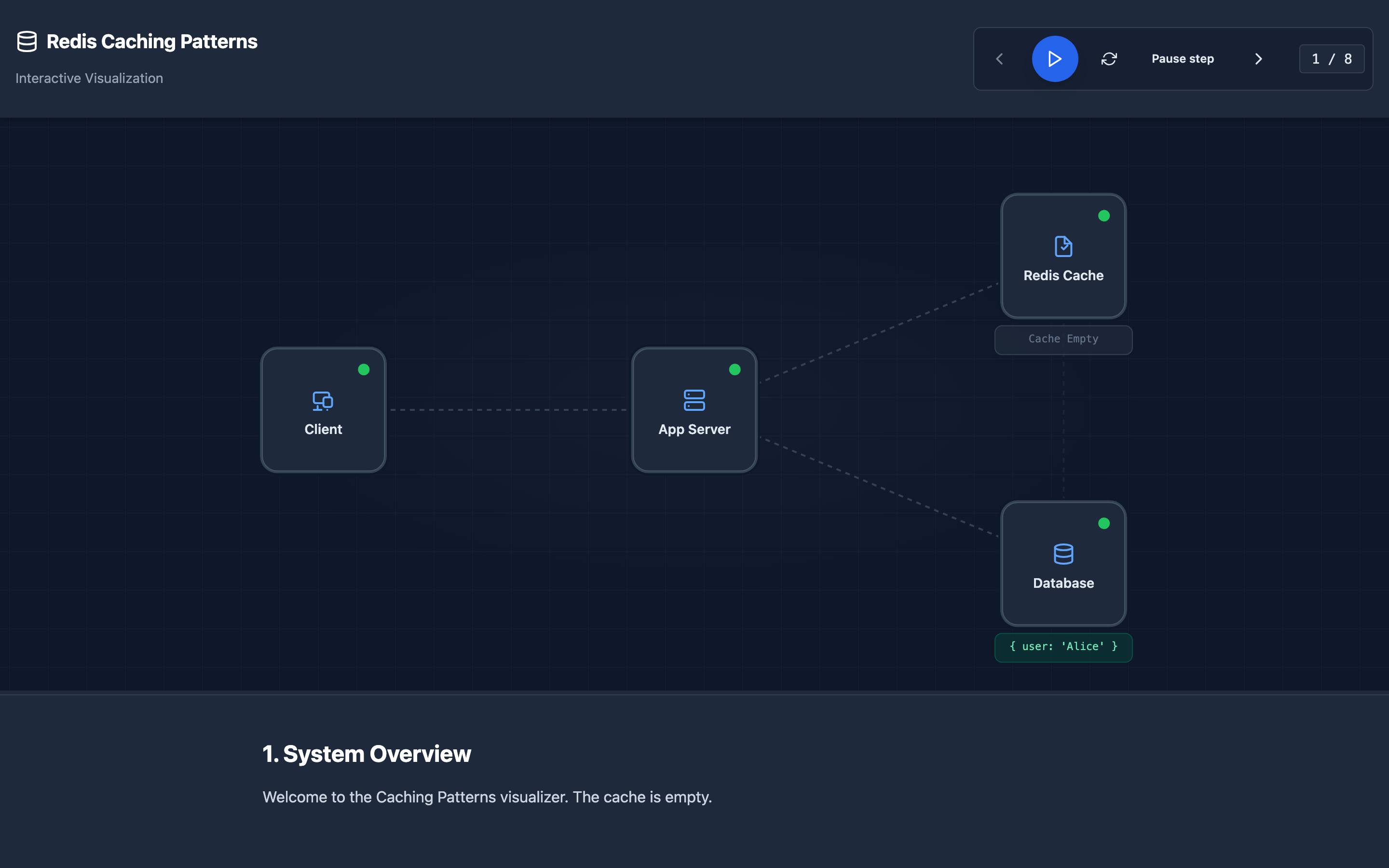
Why You Need a Caching Layer
Your PostgreSQL database can handle roughly 5,000–10,000 queries per second on modern hardware. Your application serves 50,000 reads per second. Without a cache, every read hits the database — parsing SQL, acquiring locks, reading disk blocks, and returning results.
Response times climb from 2ms to 200ms. Connection pools exhaust. The database locks up. Users see spinners.
Redis solves this by storing frequently accessed query results in memory. Reads that took 5–20ms from the database now take 0.1–0.5ms from Redis.
But introducing a cache creates a new set of problems: stale data, cache misses under load, memory pressure, and catastrophic failure modes that can take down the very database you’re trying to protect.
My rule of thumb Start with cache-aside and jittered TTLs unless you have a concrete consistency reason not to. Most teams need fewer clever cache patterns than they think.
The mental model: Redis Caching
Cache-Aside (Lazy Loading)
The most common pattern. The application checks Redis first. On a cache hit, the data is returned directly. On a cache miss, the application queries the database, writes the result to Redis with a TTL, and returns the response.
GET user:1234 → Redis HIT → return cached JSON
GET user:5678 → Redis MISS → SELECT * FROM users WHERE id=5678
                            → SET user:5678 <json> EX 300
                            → return JSON
Write-Through
Every database write also writes to Redis synchronously. Reads always hit Redis. This guarantees cache consistency but increases write latency — every INSERT or UPDATE must complete both the database write and the Redis SET before returning to the client.
Write-Behind (Write-Back)
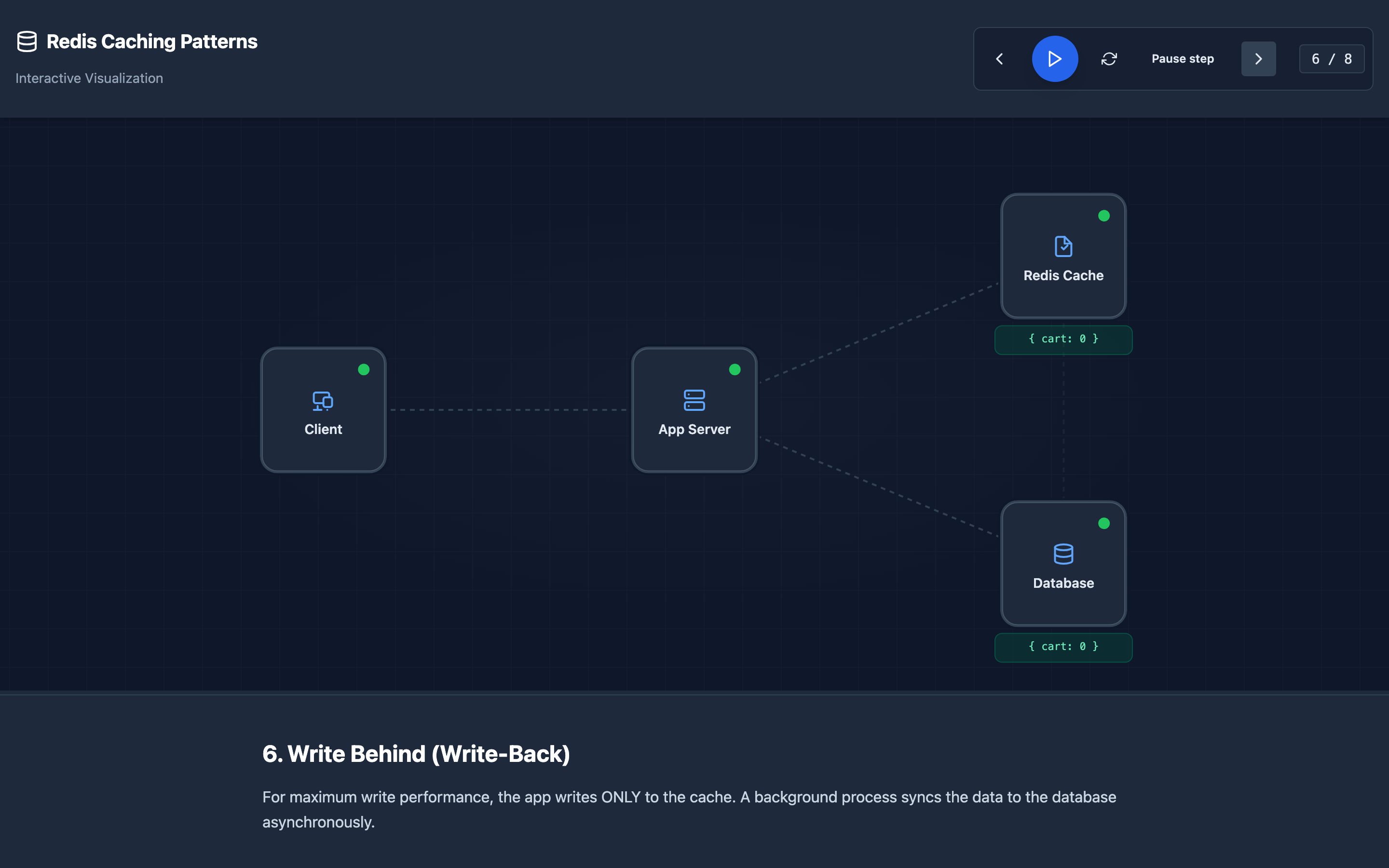
The application writes to Redis first, and a background process asynchronously syncs changes to the database. This offers the lowest write latency but risks data loss if Redis crashes before the sync completes.
Decisions that matter
- TTL (Time-to-Live): 30 seconds to 24 hours depending on data volatility. User profiles: 5–15 minutes. Product catalog: 1–6 hours. Feature flags: 30–60 seconds.
maxmemory-policy: Determines what happens when Redis runs out of memory.volatile-lruevicts keys with TTLs (least recently used first).allkeys-lruevicts any key.noevictionreturns errors on writes.- Serialization format: JSON is debuggable but large. MessagePack or Protobuf are 40–60% smaller but opaque. Choose based on debugging needs vs. memory cost.
- Key naming convention: Use
{entity}:{id}:{field}patterns (e.g.,user:1234:profile) for clarity andSCANcompatibility. - Connection pool size: Match your application thread count. Too few connections → thread blocking. Too many → Redis
maxclientsexhaustion.
Where it breaks: Cache Penetration
The failure mode: Malicious or buggy requests query keys that will never exist in the cache (e.g., user:-1, product:99999999). Every request is a cache miss, bypassing Redis entirely and slamming the database with queries that return empty results.
What you will notice:
- Cache hit ratio drops below 50% despite high traffic
redis-cli INFO statsshowskeyspace_missesclimbing much faster thankeyspace_hits- Database CPU spikes on queries that return zero rows
- Application logs show high volume of requests for non-existent IDs
What I would do:
- Cache null results: Store
SET user:99999999 null EX 60so subsequent requests for the same ID hit the cache instead of the database. Use short TTLs to avoid permanently caching “not found.” - Bloom filter gate: Before querying Redis or the database, check a Bloom filter that tracks all valid IDs. If the ID is definitely not in the set, return
404immediately. - Input validation: Reject obviously invalid IDs (negative numbers, UUIDs with wrong format) at the API layer before they reach the caching logic.
Hint Try loading the “Cache Penetration” scenario in the Redis Caching visualization to see how Bloom filters block invalid keys before they reach the database.
Where it breaks: Cache Breakdown (Hot Key Expiration)
The failure mode: A single extremely popular cache key (e.g., the homepage feed, a trending product) expires. Thousands of concurrent requests simultaneously experience a cache miss and all query the database with the same heavy query. The database chokes under the load.
What you will notice:
- Database query latency spikes sharply at regular intervals (aligned with TTL expiration)
- Redis
keyspace_missesshows sudden bursts followed by a singleSETand return to normal - Application error logs show
connection pool exhaustedduring burst windows - The same expensive SQL query appears hundreds of times in the PostgreSQL slow query log
What I would do:
- Mutex lock: When a cache miss occurs, the first thread acquires a distributed lock (
SET lock:homepage NX EX 10) and rebuilds the cache. Other threads wait or serve stale data. - Background refresh: Never let hot keys expire. A background cron job refreshes them 30 seconds before TTL expiration.
- Stale-while-revalidate: Serve the expired (stale) value immediately while triggering an async rebuild in the background.
Warning If your hot key serves thousands of requests per second, even a 1-second TTL gap can cause a stampede. Prefer background refresh over short TTLs for your most popular keys.
Where it breaks: Cache Avalanche (Mass Expiration)
The failure mode: Hundreds of cache keys were set at the same time (e.g., during application startup or after a cache flush) with the same TTL. They all expire simultaneously, causing a massive wave of cache misses that overwhelms the database.
What you will notice:
- Periodic database load spikes every N minutes (matching the common TTL value)
- Redis
dbsizedrops suddenly, then gradually recovers - Application latency increases globally, not just for one endpoint
- Memory usage on Redis drops and then slowly climbs back
What I would do:
- Jittered TTLs: Add random jitter to TTL values:
TTL = baseTTL + random(0, baseTTL * 0.2). This spreads expirations across a time window instead of a single moment. - Staggered warm-up: On application startup, warm the cache in batches with delays between each batch instead of loading everything at once.
- Layered caching: Use a local in-process cache (Caffeine, Guava) as L1 with a 10–30 second TTL, and Redis as L2. Even if Redis has a mass expiration, the L1 absorbs the immediate burst.
The tradeoff
| Pattern | Pros | Cons |
|---|---|---|
| Cache-Aside | Simple, cache is optional (system works without it) | Application owns invalidation logic, stale data window |
| Write-Through | Always consistent, no stale reads | Higher write latency, caches data that may never be read |
| Write-Behind | Lowest write latency | Data loss risk if Redis crashes, complex sync logic |
| Short TTL (30s) | Fresh data, quick recovery from stale state | Higher cache miss rate, more database load |
| Long TTL (6h) | High hit ratio, minimal database load | Stale data persists longer, manual invalidation needed |
| Null caching | Prevents penetration attacks | Memory overhead for non-existent keys |
Hint For most applications, start with cache-aside and a 5-minute TTL with jitter. Optimize from there based on your hit ratio — target 90%+ using
redis-cli INFO stats.
A practical debugging checklist
- Check hit ratio:
redis-cli INFO stats | grep keyspace— aim for 90%+ hit rate - Monitor memory:
redis-cli INFO memory— checkused_memoryvsmaxmemory - Find hot keys:
redis-cli --hotkeys(requiresmaxmemory-policyto be set) - Check eviction:
redis-cli INFO stats | grep evicted_keys— non-zero means memory pressure - Slow log:
redis-cli SLOWLOG GET 10— identify commands taking >10ms - TTL distribution:
redis-cli DEBUG OBJECT <key>— check remaining TTL of suspicious keys
Try it yourself
Understanding cache behavior requires watching data flow through the system under different conditions. Try these interactive visualizations:
- Redis Caching visualization — Step through cache hits, misses, TTL expiration, and eviction scenarios
- Redis Architecture visualization — Understand why Redis’s single-threaded event loop makes it fast and where blocking commands cause problems
- Cache Stampede simulator — Watch what happens when Redis crashes and all requests stampede the database simultaneously