When Your Load Balancer Goes Down
Learn what happens during load balancer failure: VRRP split-brain, standby capacity mismatch, DNS TTL delays, and HA failover recovery.
Why this matters: Your Single Point of Failure Just Failed
Your active load balancer handles 12,000 requests per second. At 3:47 AM, its NIC firmware locks up. Every TCP connection in flight — thousands of them — hangs until client-side timeouts fire 30 seconds later. Your standby node hasn’t promoted yet because the VRRP heartbeat interval is 3 seconds and the dead interval is 10. For those 10 seconds, your entire platform is a black hole.
The irony of load balancers is that they exist to eliminate single points of failure at the backend tier, but they themselves become the single point of failure at the edge. When the active node crashes, the blast radius isn’t one server — it’s every server behind it. Every microservice, every database connection, every user session flows through that one virtual IP (VIP).
Real-world outages show this pattern repeatedly. A crashed load balancer doesn’t just drop traffic. It triggers cascading effects: stale DNS caches route clients to a dead IP, health checks on the standby may not have up-to-date backend state, and the standby itself might be an undersized instance that buckles under full production load within seconds.
Practical note A standby that never receives real traffic is an assumption, not a failover plan. Schedule drills long enough to expose capacity mismatches.
The mental model: Active/Standby HA Failover Mechanics
In an active/standby HA configuration, two load balancer nodes share a virtual IP (VIP) using a protocol like VRRP (Virtual Router Redundancy Protocol). The active node sends heartbeat advertisements at a regular interval — typically every 1–3 seconds. The standby monitors these heartbeats.
When the standby misses a configurable number of consecutive heartbeats (the dead interval), it assumes the active node has failed and promotes itself by claiming the VIP via a gratuitous ARP broadcast.
Once the standby claims the VIP, upstream switches update their ARP tables and begin forwarding traffic to the new active node. The standby must then initialize its connection table, run health checks against all backends, and begin routing. This failover delay — the time between crash and the standby accepting its first request — typically ranges from 3 to 15 seconds depending on configuration.
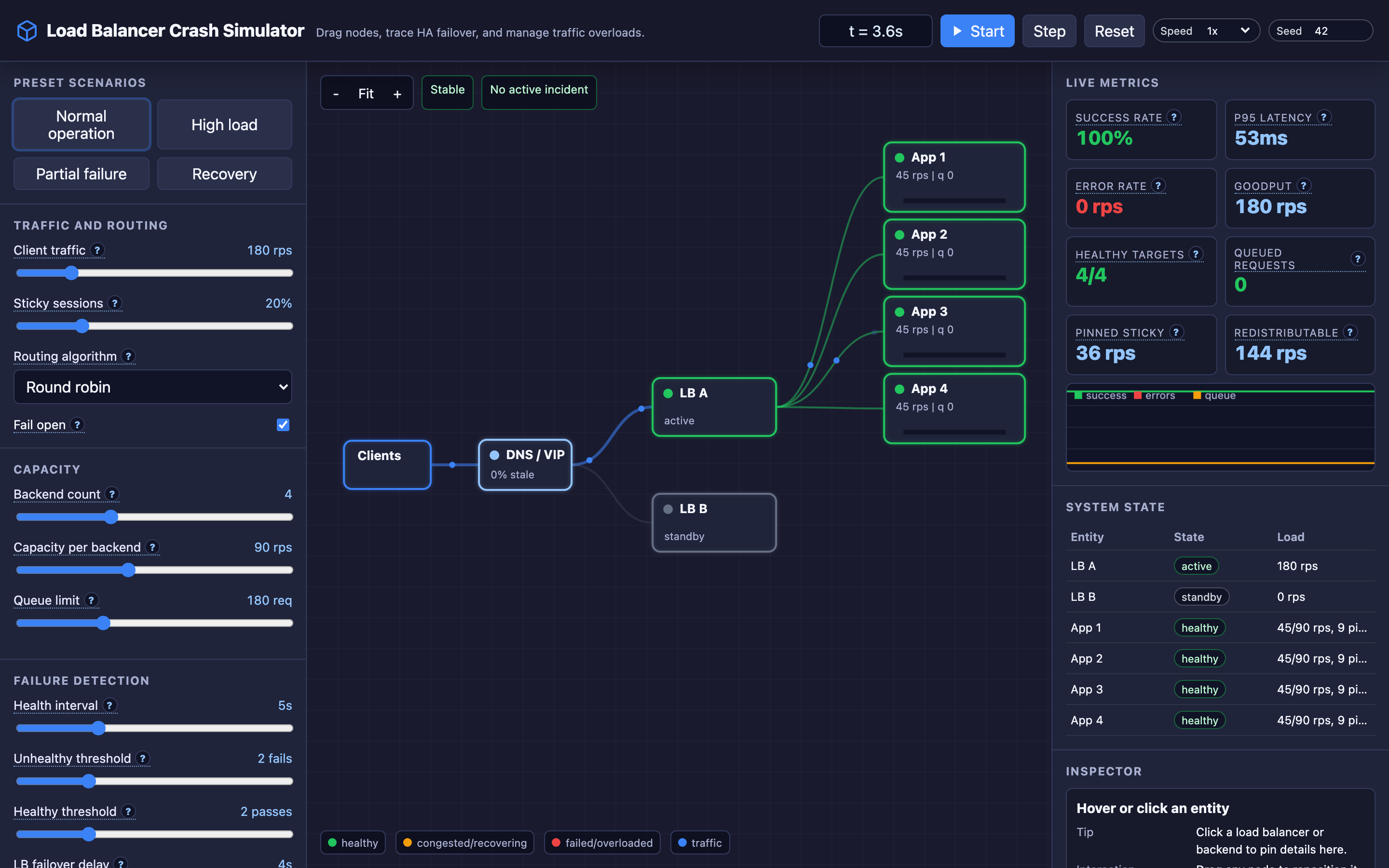
Meanwhile, DNS and client-side caching add another layer of delay. Even after the standby is live, clients that cached the old IP via DNS with a high TTL (say 300 seconds) will continue sending traffic to the dead node until their local TTL expires. During this window, those clients see connection timeouts and 5xx errors. The interactive demo lets you tune the DNS TTL and watch how stale cache decay affects traffic recovery.
Decisions that matter
-
Failover Delay (3–15 seconds): The time between the active node crashing and the standby fully accepting traffic. At 3 seconds, you get fast failover but risk false positives from transient network blips. At 15 seconds, you avoid false failovers but leave a wide outage window. In the interactive demo, crash the active LB and watch the traffic drop to zero during this gap.
-
DNS TTL (30–300 seconds): Controls how long clients cache the load balancer’s IP address. A TTL of 30 seconds means clients discover the new IP quickly after failover, but DNS query volume increases 10x compared to a 300-second TTL. The interactive demo models stale DNS cache decay — set a high TTL, crash the LB, and watch clients slowly migrate to the standby.
-
Backend Count and Capacity (1–8 backends, 50–500 req/s each): Determines total backend throughput. When the standby promotes with fewer backends than the active had registered, the surviving backends can overload instantly. Tune these in the interactive demo to find the breaking point.
-
Health Check Thresholds (consecutive failures/successes): How many consecutive failed health checks remove a backend, and how many successes re-add it. Aggressive thresholds (2 failures) remove flapping servers quickly but may cause unnecessary churn. Conservative thresholds (5 failures) keep servers in rotation longer but risk routing traffic to degraded nodes.
-
Fail-Open Routing (on/off): When all backends are marked unhealthy, fail-open sends traffic to them anyway — a last resort that can return errors but keeps the system partially functional instead of fully down.
Where it breaks: Split-Brain VRRP — Both Nodes Claim the VIP
The failure mode: A network partition between the active and standby load balancers causes the standby to stop receiving heartbeats. The standby promotes itself and claims the VIP. But the active node is still alive and still holding the VIP on its side of the partition.
Both nodes now respond to the same virtual IP. Upstream switches get conflicting ARP entries, and traffic splits unpredictably between the two nodes.
What you will notice: You’ll see intermittent 5xx errors — some requests succeed, others fail. Backend connection counts show both LB nodes routing traffic simultaneously. arping against the VIP shows two different MAC addresses responding. Prometheus metrics from both nodes show active traffic. The VRRP logs on both nodes show MASTER state.
# Detect split-brain: both nodes report MASTER
journalctl -u keepalived | grep "Entering MASTER"
# Check ARP table for duplicate VIP entries
arping -c 3 192.168.1.100
# You'll see two different MAC addresses responding
What I would do: Implement VRRP fencing with a quorum-based approach. Use a third witness node (or an external health check endpoint) that both LB nodes query. Only the node that can reach the witness promotes to master.
Configure unicast_peer in keepalived instead of multicast to reduce the chance of partition. Add preempt delay so the original master doesn’t immediately reclaim the VIP when the partition heals.
Warning Without a quorum mechanism, a network partition between your active and standby load balancers will cause split-brain — both nodes claim the VIP and traffic splits unpredictably.
Where it breaks: Standby Resource Mismatch — Undersized Failover Node
The failure mode: To save costs, the operations team provisions the standby load balancer on a smaller instance — a c5.large (2 vCPU, 4 GB RAM) standing by for a c5.2xlarge (8 vCPU, 16 GB RAM) active.
Under normal conditions, the standby sits idle so nobody notices. When failover occurs, the standby promotes and immediately receives 12,000 req/s. Its CPU saturates at 95% within 8 seconds, connection tracking tables fill up, and it starts dropping packets. The “failover” becomes a second outage.
What you will notice: After failover, p99 latency spikes from 45ms to 3200ms. The standby’s CPU usage jumps to 100%. conntrack -L shows the connection table at maximum capacity. Prometheus alerts fire for node_cpu_seconds_total and node_network_receive_drop_total on the standby. New TCP connections get ETIMEDOUT. Backend servers show reduced traffic despite being healthy — the bottleneck is the LB itself.
# Kubernetes HPA won't help here — LBs aren't pods
# Ensure standby matches active in capacity
# keepalived.conf
vrrp_instance VI_1 {
    state BACKUP
    priority 100
    advert_int 1
    # Standby MUST match active instance specs
    # c5.2xlarge, NOT c5.large
}
What I would do: Always provision standby nodes with identical specs to the active. Use the interactive demo to test this: set high request rates and low backend capacity, then crash the active LB. Watch the standby struggle when its capacity doesn’t match.
In production, run periodic failover drills (game days) that force traffic to the standby for 30 minutes. This validates that the standby can actually handle production load.
Hint The interactive demo lets you configure mismatched active/standby capacity. Crash the active LB under high load to see when the undersized standby buckles.
Where it breaks: DNS Failover Delays From Cached Entries
The failure mode: The load balancer’s DNS record has a TTL of 300 seconds (5 minutes). The active LB crashes and the standby promotes within 5 seconds — a textbook failover. But 60% of your clients still have the old IP cached locally.
For the next 4 minutes and 55 seconds, those clients keep sending requests to the dead IP address, getting connection timeouts. Your monitoring shows the standby is healthy, but user-facing error rates remain at 60%.
What you will notice: Your dashboard shows a sharp split: some clients recover immediately (those whose DNS cache happened to expire), while others continue failing. Client-side error logs show ECONNREFUSED or ETIMEDOUT against the old IP.
Server-side metrics on the standby show traffic ramping up slowly in a staircase pattern as client caches expire. Running dig +short your-lb.example.com returns the new IP, but curl from affected clients still hits the old one.
# Check the TTL of your LB's DNS record
dig +nocmd +noall +answer your-lb.example.com
# Output: your-lb.example.com. 300 IN A 10.0.1.50
# That 300-second TTL means 5 minutes of stale cache risk

# Monitor client recovery curve
# Watch standby traffic ramp over time
kubectl logs -f deployment/envoy-proxy | grep "upstream_rq_total"
What I would do: Set DNS TTL to 30–60 seconds for load balancer records. Yes, this increases DNS query volume, but the tradeoff is worth it for critical edge infrastructure.
Use health-checked DNS failover services (AWS Route 53 health checks, Cloudflare load balancing) that proactively update records when the primary fails. The interactive demo lets you tune DNS TTL directly — set it to 300, crash the LB, and watch the long tail of stale cache traffic. Then set it to 30 and see the dramatic improvement.
The tradeoff
| Approach | Pros | Cons |
|---|---|---|
| Fast heartbeat (1s interval, 3s dead) | Failover in 3 seconds, minimal traffic loss | False positives from network jitter trigger unnecessary failovers |
| Slow heartbeat (3s interval, 10s dead) | Stable, avoids false failovers | 10-second outage window on every real failure |
| Matched standby sizing | Standby handles full production load | 2x cost for idle capacity |
| Undersized standby | Lower cost | Standby buckles under production load, turns failover into a second outage |
| Low DNS TTL (30s) | Clients discover new IP in under 30 seconds | 10x more DNS queries, higher DNS infrastructure load |
| High DNS TTL (300s) | Minimal DNS query volume | Up to 5 minutes of stale cache traffic after failover |
| Fail-open routing | Partial service when all backends are down | Returns errors/degraded responses to users |
| Fail-closed routing | No degraded responses | Complete outage if all backends fail health checks |
Hint For most production setups, a 1-second heartbeat interval, 30-second DNS TTL, and matched standby sizing gives the best balance of fast recovery and operational stability.
A practical checklist
Step 1: Validate your failover actually works. Schedule monthly failover drills. Force-kill the active LB during business hours and measure: time-to-promote, traffic loss during failover, standby CPU/memory under load. If you’ve never tested failover, assume it’s broken.
Step 2: Check standby parity. Run diff on the active and standby configurations. Verify instance types match. Compare health check configurations, backend registrations, and SSL certificate deployments. A standby with stale certs will fail TLS termination on promotion.
Step 3: Audit your DNS TTLs. Run dig against your LB’s DNS record and check the TTL. If it’s above 60 seconds, lower it. Configure health-checked failover in your DNS provider.
# Step 1: Force failover test
sudo systemctl stop keepalived  # on active node

# Step 2: Verify standby promoted
journalctl -u keepalived | grep "MASTER"
ip addr show | grep 192.168.1.100  # VIP should appear

# Step 3: Measure traffic recovery
curl -w "time_total: %{time_total}\n" -o /dev/null https://your-lb.example.com/health

# Step 4: Check DNS propagation
watch -n 5 'dig +short your-lb.example.com'
Step 4: Monitor the right metrics. Set up Prometheus alerts for: VRRP state changes (keepalived_vrrp_state), backend health check failures, connection tracking table utilization, and DNS query error rates. Alert on state transitions, not just failure counts.
Step 5: Implement connection draining. Before decommissioning the old active node after recovery, drain existing connections gracefully. Configure a drain timeout of 30–60 seconds so in-flight requests complete instead of being forcefully terminated.
Try it yourself
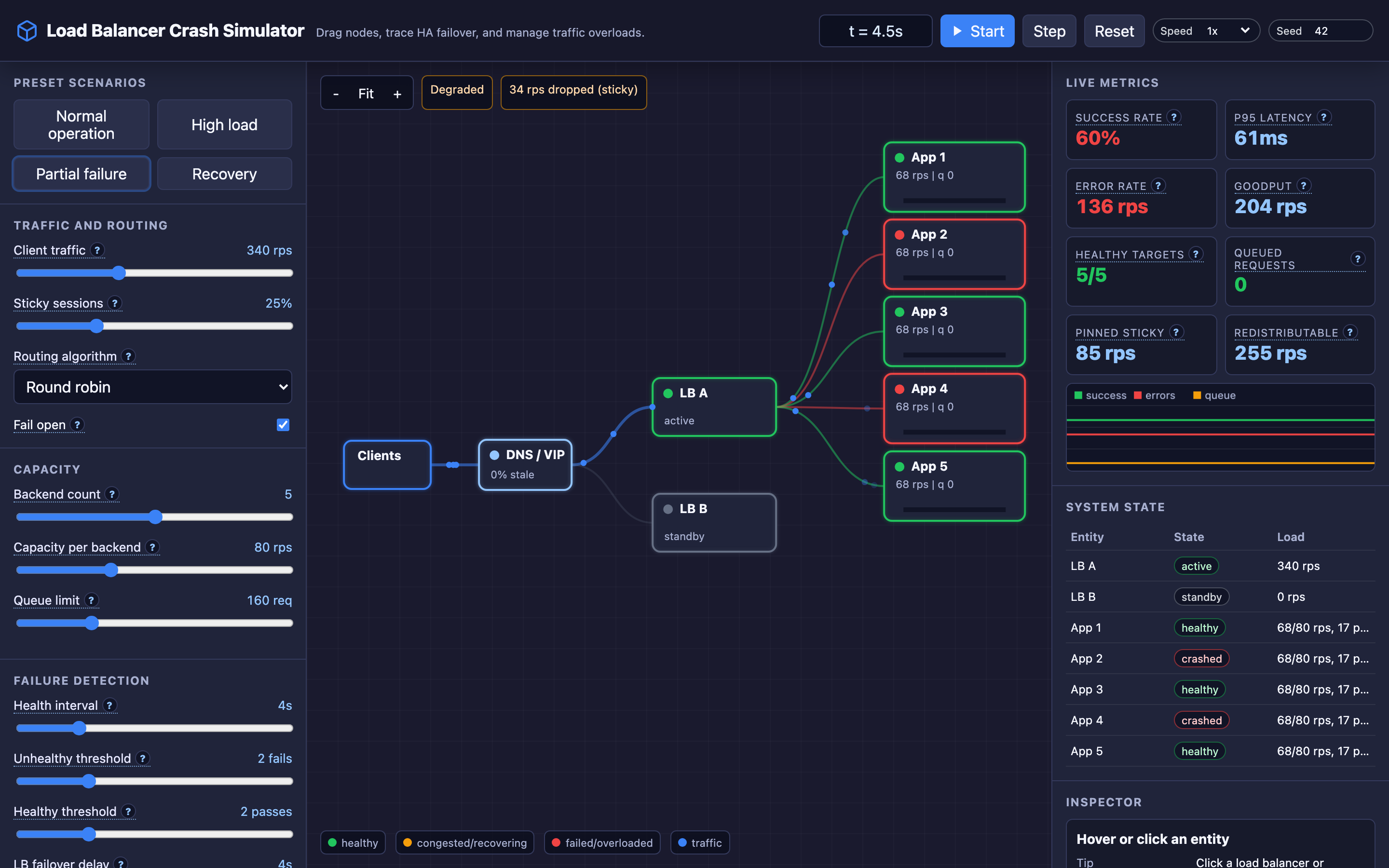
Reading about failover is one thing. Watching 12,000 requests per second hit a dead node while DNS caches slowly expire is another. The interactive demo lets you crash the active LB, watch the standby promote, tune the failover delay, and see how DNS TTL affects client recovery curves.
Try the interactive Load Balancer Crash demo — crash the active node, adjust failover delay and DNS TTL, and watch how traffic recovers in real time.