Error Budgets: Balancing Reliability and Speed
Learn how SRE teams use error budgets, SLIs, SLOs, burn rates, and multi-window alerts to balance reliability with shipping speed.
Why this matters: Product Teams Want Speed, SRE Teams Want Stability
Every engineering organization faces the same tension. Product managers push to ship features weekly — sometimes daily. Reliability engineers push back because every deployment introduces risk: a misconfigured environment variable, an untested edge case, a database migration that locks a table for 12 seconds.
Without a shared framework, these teams argue in circles. The product team says “we need to ship the redesigned checkout flow by Friday.” The SRE team says “the last three deploys caused 500-error spikes.” Nobody has a number to point at.
The result is either a culture where reliability is ignored until a major outage, or a culture where deployments require three approval committees and a blood sacrifice.
Error budgets solve this by turning reliability into a measurable, spendable resource. If your service has a 99.9% SLO, you’re allowed 0.1% of all requests to fail over a rolling 30-day window. That’s your budget. Ship features, take risks — but when the budget runs out, you stop deploying and fix what’s broken. No arguments. The math decides.
My rule of thumb Error budgets work when both product and engineering trust the number. If teams start gaming the SLI, the process has already failed.
The mental model: Burn Rates, SLIs, and the 30-Day Window
An error budget starts with three components: a Service Level Indicator (SLI), a Service Level Objective (SLO), and the rolling window over which you measure them.
The SLI is the actual measured reliability of your service. For an HTTP API, this is typically the ratio of successful responses (2xx/3xx) to total responses. For a data pipeline, it might be the percentage of records processed within a latency threshold. The SLO is your target — say 99.9%. The error budget is the gap: 100% - 99.9% = 0.1%.
Over a 30-day window serving 10 million requests per day, a 99.9% SLO gives you an error budget of roughly 300,000 allowed errors across the entire month. That sounds like a lot — until a single bad deploy burns through 50,000 errors in 20 minutes.
Burn rate is the speed at which you consume this budget relative to the window. A burn rate of 1x means you’ll exactly exhaust your budget at the end of the 30-day window. A burn rate of 10x means you’ll exhaust it in 3 days. A burn rate of 100x means you have about 7 hours before the budget hits zero.
# Prometheus recording rule for burn rate
groups:
  - name: slo-burn-rate
    rules:
      - record: slo:error_ratio:rate5m
        expr: |
          sum(rate(http_requests_total{code=~"5.."}[5m]))
          /
          sum(rate(http_requests_total[5m]))
      - record: slo:burn_rate:5m
        expr: |
          slo:error_ratio:rate5m / (1 - 0.999)
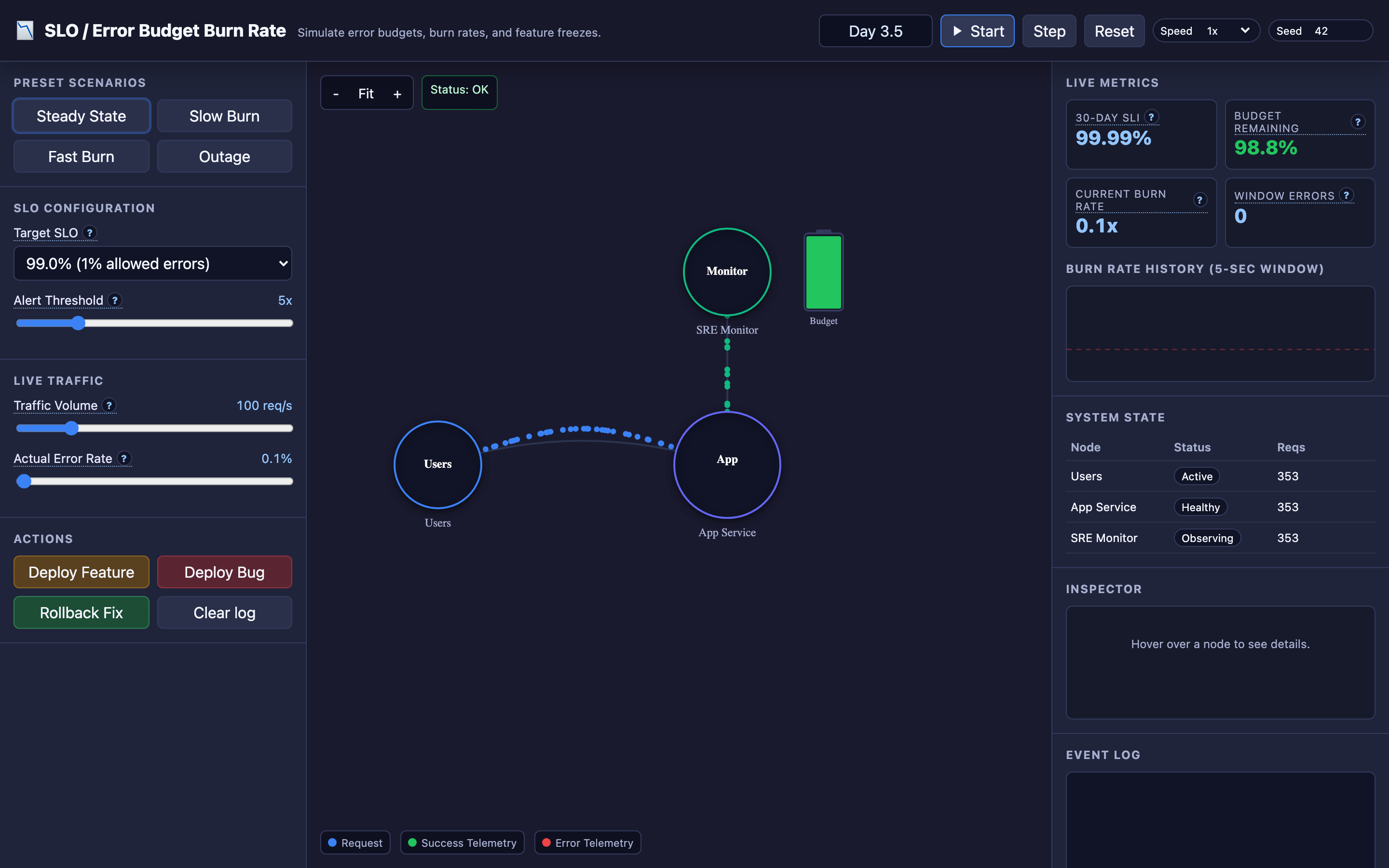
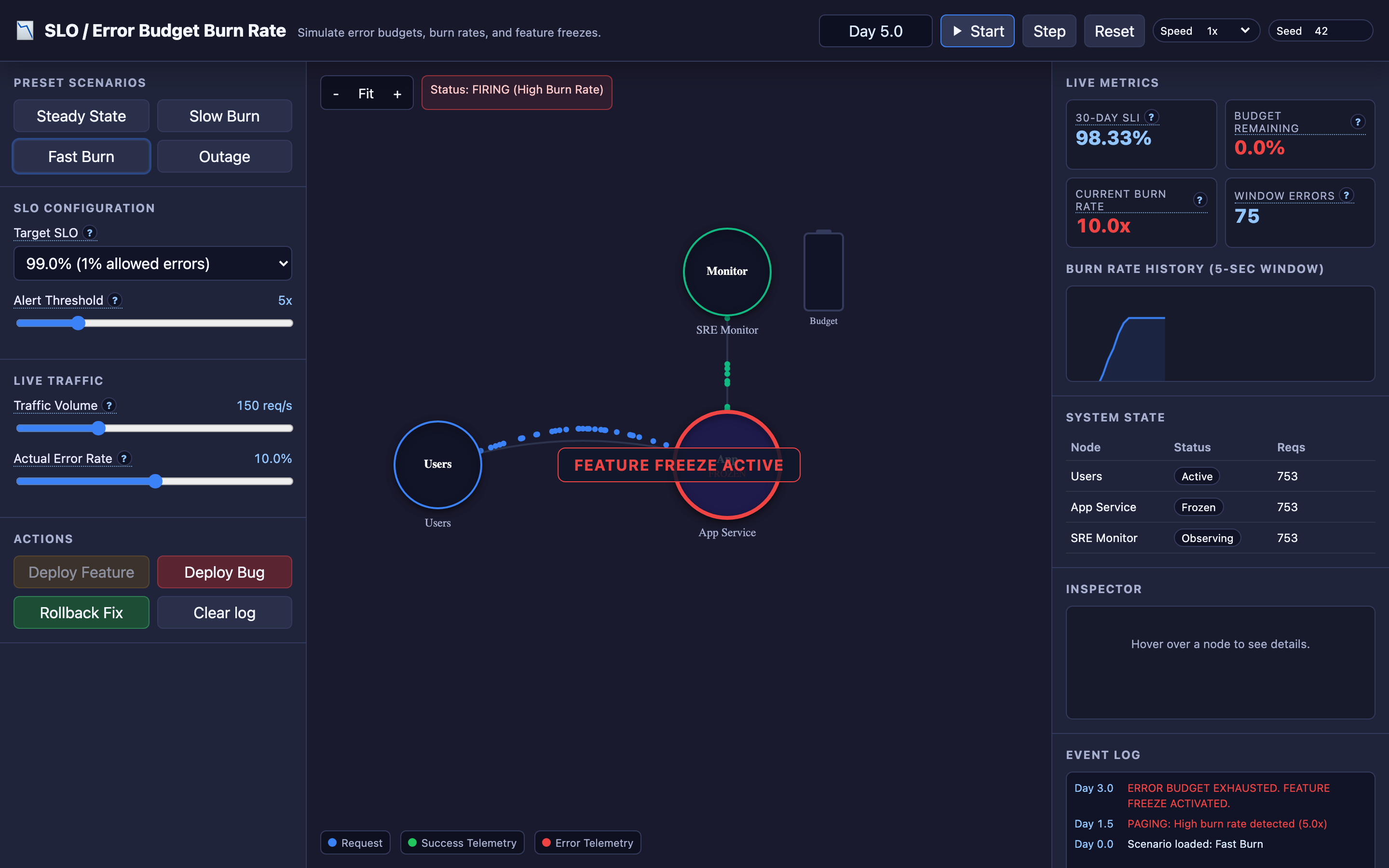
In the interactive demo, time is scaled so that 30 seconds of real simulation time represents a full 30-day SLO window. You can watch green and red particles flow from users to the app service, with telemetry signals streaming to the SRE monitor. The monitor displays a live “battery” gauge that drains as errors accumulate — making the abstract concept of budget depletion viscerally visible.
Decisions that matter
| Parameter | Range | Low End Effect | High End Effect |
|---|---|---|---|
| SLO Target | 99.0% – 99.99% | 1% error budget (~3M errors/month at 10M req/day). Very forgiving — teams rarely freeze. | 0.01% budget (~30K errors/month). A single bad deploy can exhaust it. |
| Burn Rate Alert Threshold | 1x – 100x | Alerts on slow bleeds that take weeks to exhaust budget. High alert volume. | Only alerts on catastrophic burns. Misses slow leaks entirely. |
| Rolling Window | 7 days – 30 days | Shorter memory. Budget resets quickly after incidents. Less accountability. | Longer memory. A bad week haunts you for a month. More pressure to fix root causes. |
| Alert Evaluation Window | 5m – 6h | Catches fast spikes but generates noise from transient blips. | Smooths out noise but delays detection of real incidents by hours. |
| Feature Freeze Trigger | 0% – 25% remaining | Freeze only when budget is fully exhausted. Maximum shipping speed, but no safety margin. | Freeze with 25% remaining. Conservative — teams have buffer but ship fewer features. |
Where it breaks: Alert Fatigue from Noisy SLI-Based Alerts
The failure mode: The SRE team configures burn rate alerts with a single short evaluation window (e.g., 5 minutes). Every transient spike — a momentary network hiccup, a client retry storm, a brief GC pause — fires an alert.
Within a week, the on-call engineer receives 40+ pages, most of which resolve themselves within minutes.
What you will notice:
- PagerDuty shows dozens of “burn rate > 10x” alerts per week with MTTR under 2 minutes
- On-call engineers start acknowledging alerts without investigating
prometheusquerycount(ALERTS{alertname="HighBurnRate"})shows alert churn exceeding 5 per day- When a real 50x burn rate incident occurs, the on-call engineer assumes it’s another false positive and doesn’t respond for 15 minutes
What I would do: Implement multi-window burn rate alerting as described in Google’s SRE workbook. Use a fast window (5m) AND a slow window (1h) together — the alert only fires when both windows show elevated burn rates simultaneously.
This eliminates transient spikes while still catching sustained burns.
# Multi-window burn rate alert
- alert: HighBurnRate
  expr: |
    slo:burn_rate:5m > 14.4
    AND
    slo:burn_rate:1h > 14.4
  for: 2m
  labels:
    severity: critical
  annotations:
    summary: "Error budget burn rate is 14.4x on both 5m and 1h windows"
Hint The interactive demo’s “Fast Burn” preset demonstrates exactly why single-window alerts cause fatigue. Switch to multi-window alerting and watch how transient spikes no longer trigger false alarms.
Where it breaks: Gaming Metrics by Excluding Errors from the SLI
The failure mode: A team realizes their SLI calculation is counting health check failures, bot traffic errors, and internal admin API errors against the budget. To “fix” this, they add aggressive exclusion filters: code!~"5.." OR path=~"/health|/admin|/internal.*".
Over time, engineers add more exclusions whenever a new error source appears. Eventually, the SLI excludes 30% of actual user-facing traffic.
What you will notice:
- The SLO dashboard shows 99.98% reliability while customer support tickets mention frequent errors
http_requests_totaltotal count is significantly higher than what the SLI query includes- Error budget remains above 80% even during weeks when users report degraded experience
- The exclusion filter in Prometheus grows to 10+ regex clauses that nobody fully understands
- Post-incident reviews reveal that the failing endpoint was excluded from SLI measurement
What I would do: Define SLIs based on what users actually experience, not what’s convenient to measure. Start with a simple inclusion rule: any request from an external client to a user-facing endpoint counts.
Document every exclusion with a justification and review them quarterly. Use a separate “operational SLI” for internal traffic.
# Good: explicit inclusion of user-facing traffic
sli:success_ratio:
  expr: |
    sum(rate(http_requests_total{code!~"5..", job="api-gateway", source="external"}[5m]))
    /
    sum(rate(http_requests_total{job="api-gateway", source="external"}[5m]))
Warning Every SLI exclusion filter is a potential blind spot. If you exclude more than 10% of traffic from your SLI, your error budget no longer reflects real user experience.
Where it breaks: Exhausting Budget Without Freezing Deploys
The failure mode: The team tracks error budgets in a Grafana dashboard, but there’s no automated enforcement. When the budget hits 0%, an alert fires and someone posts in Slack: “Error budget exhausted — please hold off on deploys.”
The product team has a launch deadline and deploys anyway. The new code introduces another bug, and the service drops to 98.5% reliability for 48 hours.
What you will notice:
- Error budget gauge shows 0% remaining but the deployment pipeline continues running
kubectl rollout historyshows deployments occurring after budget exhaustionp99latency spikes to4500msas cascading errors overload retry logic- Incident timeline shows 3 deploys within 24 hours of budget exhaustion, each making things worse
- Grafana burn rate chart shows sustained 50x+ burn after the budget hit zero
What I would do: Automate the feature freeze. Integrate error budget checks into your CI/CD pipeline gate. When the budget drops below a threshold (e.g., 10% remaining), the deployment pipeline requires an explicit SRE override to proceed.
# GitLab CI deployment gate
deploy_production:
  stage: deploy
  script:
    - ./check_error_budget.sh --slo=api-gateway --threshold=10
    - kubectl apply -f deployment.yaml
  rules:
    - if: $FORCE_DEPLOY == "true"
      when: manual
      allow_failure: false
In the interactive demo, you can watch this exact scenario unfold: deploy a bug using the incident controls to spike the burn rate, observe the error budget battery drain to zero, then perform a rollback and watch the budget slowly recover as good requests flow through the rolling window.
The tradeoff
| Approach | Pros | Cons |
|---|---|---|
| Strict SLO (99.99%) | Extremely stable user experience. Forces rigorous testing and canary practices. | Tiny error budget (~30K errors/month at 10M/day). A single misconfigured deploy can exhaust it. Teams ship slowly. |
| Loose SLO (99.5%) | Large error budget (~1.5M errors/month). Teams ship fast with room for experiments. | Users experience noticeable errors. 0.5% failure rate means 50K users/day see errors at 10M requests. |
| Multi-window alerts | Eliminates transient noise. Catches sustained burns. Low false-positive rate. | More complex to configure. Requires understanding of burn rate math across windows. |
| Single-window alerts | Simple to set up. Fast detection of sudden spikes. | High false-positive rate. Alert fatigue erodes team responsiveness over time. |
| Manual deploy freeze | Flexible. Teams can make judgment calls about risk. | Relies on human discipline. Breaks down under launch pressure. Budget violations go unenforced. |
| Automated deploy gate | Consistent enforcement. No human override without explicit approval trail. | Requires CI/CD integration. Can block urgent hotfixes if not designed with escape hatches. |
Hint Start with a 99.9% SLO and a 30-day window. This gives enough budget for 2–3 minor incidents per month while still enforcing meaningful reliability standards.
A practical checklist
Step 1: Validate your SLI accuracy. Run sum(rate(http_requests_total[30d])) and compare total request volume against what your SLI query covers. If the SLI covers less than 90% of user-facing traffic, your error budget is meaningless.
Step 2: Set up multi-window burn rate alerts. Configure at least two alert tiers: a 5m/1h window pair for fast burns (severity: critical, page immediately) and a 30m/6h window pair for slow burns (severity: warning, Slack notification).
Step 3: Build a budget depletion dashboard. In Grafana, create a time-series panel showing 1 - (errors_consumed / errors_allowed) over the rolling window. Add a threshold line at 10% remaining and another at 0%.
Step 4: Integrate budget checks into CI/CD. Add a pre-deploy script that queries Prometheus for the current budget remaining. If below your threshold, fail the pipeline with a clear message: “Error budget at 8%. Deployment blocked. Run with FORCE_DEPLOY=true and SRE approval to override.”
Step 5: Run monthly error budget reviews. Pull up the 30-day burn rate history. Identify which deploys or incidents consumed the most budget. Prioritize fixes for the top 3 budget consumers. Track whether the same root causes recur.
Try it yourself
The concepts above become intuitive when you can watch them unfold in real time. The error budget simulator lets you toggle between Steady State, Slow Burn, Fast Burn, and Outage scenarios — watching particles flow from users to your service while the SRE monitor’s battery gauge drains in real time.
Deploy a bug, observe the burn rate spike, trigger a rollback, and watch the budget recover.
Try the interactive Error Budget demo → Experiment with burn rates, alert thresholds, and feature freezes to build intuition for how SLO-driven reliability actually works in production.