How Systems Like Uber Scale Databases to Handle Millions of Rides
Learn how database sharding scales writes, why shard keys create hotspots, and how hash, range, and virtual shards affect operations.
Why this matters
Uber processes 25 million trips per day. Each trip generates writes to rides, payments, driver locations, and pricing tables. A single PostgreSQL instance — even on the largest available hardware (128 cores, 2TB RAM) — tops out around 50,000 writes per second before disk I/O becomes the bottleneck. Uber needs 200,000+ writes per second during peak hours in a single city.
Vertical scaling hits a wall. You can’t buy a server with 512 cores. Even if you could, a single point of failure serving all writes means a single disk controller failure takes down ride-hailing for an entire metro area.
The answer is horizontal scaling — splitting the database into multiple independent shards, each responsible for a subset of the data. But sharding is not a magic button. It introduces profound complexity: how do you choose which data goes to which shard? What happens when a query needs data from multiple shards? How do you add shards without downtime?
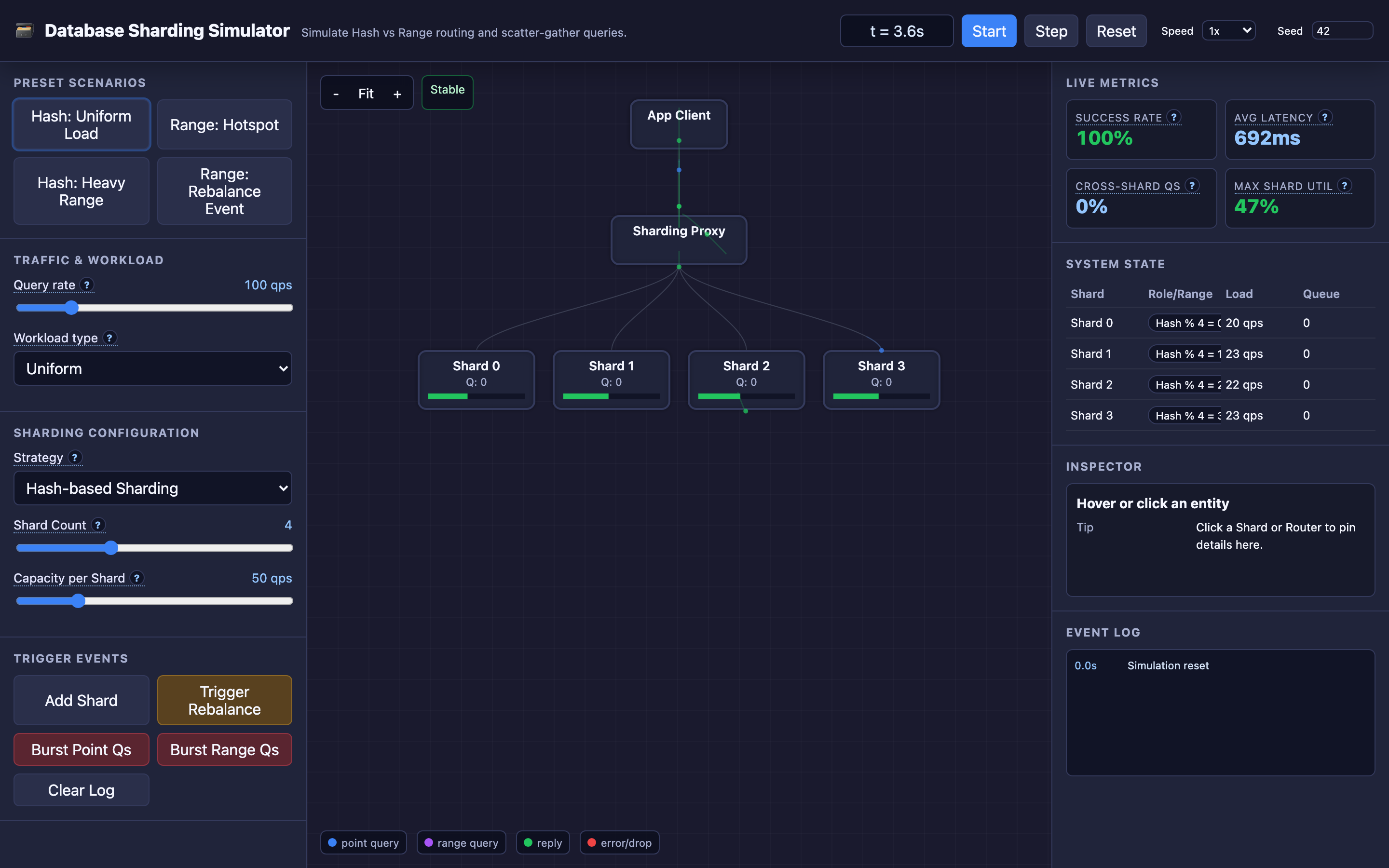
Get the shard key wrong, and you’ve traded one overloaded database for one overloaded shard and three idle ones. The TechViz simulator lets you compare hash-based and range-based strategies side by side, watching hotspots form, scatter-gather queries fan out, and rebalancing redistribute load in real-time.
My rule of thumb Sharding is a last-resort scaling tool. It buys write capacity by making routing, migrations, and debugging permanently harder.
The mental model
A sharding architecture places a routing layer (sharding proxy) between the application and the database cluster. The application sends queries to the router, which inspects the query’s shard key and determines which physical shard stores the relevant data.
Hash sharding uses a deterministic hash function: shard_id = hash(shard_key) % N, where N is the number of shards. A query for user_id = 12345 is hashed to shard 3, and the router sends it directly there. This distributes writes uniformly across shards — no hotspots.
But range queries like SELECT * FROM orders WHERE created_at BETWEEN '2026-01-01' AND '2026-01-31' require scatter-gather: the router must send the query to every shard (because hashing destroys key ordering), collect results from all N shards, and merge them. With 16 shards, every range query consumes 16× the cluster resources.
Range sharding assigns contiguous blocks of the keyspace to specific shards. Shard 1 handles user_id 1–100,000, Shard 2 handles 100,001–200,000, and so on. Range queries like WHERE user_id BETWEEN 50000 AND 60000 hit only Shard 1 — no scatter-gather. But if new user signups are sequential, all new writes go to the last shard. That shard becomes a hot shard while earlier shards sit idle.
In the interactive demo, each shard has a processing capacity limit and a bounded queue. Queries exceeding the queue capacity are dropped, representing real-world connection timeouts. You can watch queue depths grow, see dropped queries appear, and observe how different strategies handle the same workload.
Decisions that matter
Sharding Strategy (Hash vs. Range)
The fundamental architectural decision. Hash sharding guarantees uniform write distribution but sacrifices efficient range queries. Range sharding preserves data locality for range queries but creates hotspots when access patterns are skewed.
In practice, many systems use compound strategies: hash the tenant ID for cross-tenant isolation, then range-partition within each tenant by timestamp.
-- PostgreSQL declarative partitioning (hash-based)
CREATE TABLE orders (
    order_id BIGINT,
    user_id  BIGINT,
    amount   DECIMAL(10,2),
    created_at TIMESTAMPTZ
) PARTITION BY HASH (user_id);

CREATE TABLE orders_shard_0 PARTITION OF orders
    FOR VALUES WITH (MODULUS 4, REMAINDER 0);
CREATE TABLE orders_shard_1 PARTITION OF orders
    FOR VALUES WITH (MODULUS 4, REMAINDER 1);
Number of Shards
More shards means more parallelism and smaller per-shard datasets, but also more scatter-gather overhead for cross-shard queries. A 4-shard cluster handles scatter-gather with 4× fanout. A 64-shard cluster requires 64× fanout for the same query.
CockroachDB recommends starting with 2–4× the number of CPU cores divided by the replication factor.
Shard Key Selection
The most consequential decision in any sharding architecture. A good shard key has high cardinality (many distinct values), even distribution, and appears in most queries as a filter predicate.
user_id is often ideal — high cardinality, even distribution, and most queries are user-scoped. created_at is terrible for hash sharding (doesn’t appear in point lookups) and creates hotspots in range sharding (all new writes hit the latest partition).
Warning Choosing the wrong shard key is extremely difficult to fix after launch. Migrating to a new shard key typically requires a full data migration with downtime. Invest time upfront to analyze your query patterns before committing.
Queue Capacity Per Shard
Each shard’s bounded queue determines how many concurrent queries it can buffer. At capacity, new queries are dropped (timeout). The interactive demo lets you observe queue depths in real-time — when one shard’s queue overflows while others are nearly empty, you’ve found a hotspot.
Where it breaks: Hot Shards from Bad Shard Key Selection
The failure mode: A social media platform shards its posts table by celebrity_id. Most posts are written by regular users who generate 1–5 posts per day. But 500 celebrity accounts generate 200 posts per hour each, and their posts receive 10,000× more reads (likes, comments, shares).
The shard containing the top 50 celebrities handles 60% of all read traffic. Its CPU is pinned at 95%, query latency is 800ms (vs. 15ms on other shards), and the connection pool is permanently exhausted.
What you will notice:
- Per-shard CPU metrics show one shard at 95%, others at 15–20%
- Query latency
p99on the hot shard:800ms. Other shards:15ms - Connection pool utilization on the hot shard: 100%. Other shards: 25%
EXPLAIN ANALYZEon the hot shard shows full table scans taking 3× longer due to larger dataset- Application-level timeouts only affect queries routed to the hot shard
What I would do: Use a composite shard key that combines a high-cardinality field with the primary entity. Instead of celebrity_id, shard by hash(celebrity_id + post_id) % N. This distributes a single celebrity’s posts across all shards.
For read-heavy entities, add a caching layer (Redis) in front of the hot shard. The TechViz simulator’s “Range: Hotspot” preset helps reproduce this scenario — watch one shard overflow while others sit idle.
Where it breaks: Cross-Shard Query Exhaustion
The failure mode: An analytics dashboard queries SELECT region, SUM(revenue) FROM orders WHERE created_at > '2026-01-01' GROUP BY region. The orders table is hash-sharded by user_id. Since the query filters by created_at (not the shard key), the router executes a scatter-gather: the query fans out to all 16 shards.
Each shard runs a partial aggregation, returning results to the router for merging. At 100 concurrent dashboard users, the cluster handles 1,600 simultaneous shard queries — 16× the apparent load. Shard queue depths spike, response times balloon to 5 seconds, and OLTP queries (point lookups by user_id) start timing out because they’re competing for shard resources with analytics scatter-gather queries.
What you will notice:
- Query latency on all shards increases uniformly (not a hotspot — it’s systemic overload)
pg_stat_activityshows dozens of identical queries running simultaneously on every shard- Network bandwidth between the router and shards spikes during dashboard usage
- OLTP query latency degrades during analytics windows, even though OLTP queries only hit single shards
- Router logs show scatter-gather fanout:
Query routed to 16/16 shards, merge time: 2400ms
What I would do: Separate OLTP and OLAP workloads. Replicate shard data to a dedicated analytics database (ClickHouse, BigQuery, or a read-replica cluster) and route dashboard queries there.
For the OLTP cluster, implement query classification at the router: reject or deprioritize scatter-gather queries that exceed a fanout threshold (e.g., >4 shards). The interactive demo’s “Heavy Range Queries” preset shows how scatter-gather under hash sharding overwhelms the cluster.
Hint The interactive demo’s “Hash: Uniform Load” preset shows the ideal case. Switch to “Heavy Range Queries” to see how scatter-gather can overwhelm even a well-distributed cluster.
Where it breaks: Rebalancing Complexity During Live Traffic
The failure mode: A 4-shard range-partitioned cluster has developed a hotspot: Shard 2 (key range 100K–200K) handles 45% of traffic because the most active users have IDs in that range. The team triggers a rebalance to split Shard 2’s range into two shards (100K–150K on Shard 2, 150K–200K on new Shard 5).
During the rebalance, 50% of Shard 2’s data (roughly 30GB) must be physically copied to Shard 5. This copy takes 25 minutes at 20MB/s. During the copy, the routing table is in a transitional state — some queries for the 150K–200K range hit Shard 2 (stale), others hit Shard 5 (incomplete). Users see intermittent RecordNotFound errors for 25 minutes.
What you will notice:
- Rebalance operation shows progress:
Rebalancing: 42% complete, 18GB remaining - Application logs show
RecordNotFounderrors for keys in the migrating range - Both Shard 2 and Shard 5 report elevated disk I/O during the data copy
- Write conflicts appear if both the old and new shard accept writes for the migrating range
- Monitoring shows a “split” in query routing: some requests succeed, others fail, for the same key range
What I would do: Use virtual sharding (also called pre-splitting). Instead of creating 4 physical partitions, create 256 virtual partitions mapped to 4 physical shards. When rebalancing, you move entire virtual partitions (which are small, ~1GB each) rather than splitting and copying data within a partition.
The routing table update is atomic — a virtual partition is either on Shard 2 or Shard 5, never in between. Vitess (YouTube’s sharding layer) uses this approach, and the TechViz simulator’s “Range: Rebalance Event” preset lets you trigger a rebalance and watch partition boundaries adjust.
# Vitess VSchema: virtual sharding with vindexes
{
  "sharded": true,
  "vindexes": {
    "hash": { "type": "hash" }
  },
  "tables": {
    "orders": {
      "columnVindexes": [
        { "column": "user_id", "name": "hash" }
      ]
    }
  }
}
The tradeoff
| Approach | Pros | Cons |
|---|---|---|
| Hash sharding | Uniform write distribution, no hotspots | Scatter-gather for all range queries, O(N) fanout |
| Range sharding | Efficient range queries (single-shard), data locality | Hotspots on sequential keys, uneven load distribution |
| Composite shard key | Balances distribution with query routing | More complex routing logic, harder to change later |
| Few shards (4–8) | Low scatter-gather overhead, simpler operations | Limited parallelism, earlier capacity ceiling |
| Many shards (32–128) | High parallelism, small per-shard datasets | Massive scatter-gather cost, complex topology management |
| Physical partitions only | Simple mapping, straightforward splits | Rebalancing requires data copying, causes downtime |
| Virtual sharding (pre-splitting) | Atomic rebalancing, zero-downtime migration | Additional routing indirection, more metadata to manage |
A practical checklist
Step 1: Identify hot shards. Query per-shard metrics to find load imbalance:
-- Check table sizes per partition
SELECT schemaname, tablename, pg_size_pretty(pg_total_relation_size(schemaname || '.' || tablename))
FROM pg_tables WHERE tablename LIKE 'orders_shard_%';
Step 2: Analyze query routing patterns. Log scatter-gather queries and their fanout factor. Any query hitting more than 25% of shards should be reviewed for shard key optimization.
Step 3: Evaluate shard key cardinality. Check if the shard key has enough distinct values:
SELECT COUNT(DISTINCT user_id) AS cardinality,
       COUNT(*) AS total_rows,
       COUNT(DISTINCT user_id)::float / COUNT(*) AS selectivity
FROM orders;
Step 4: Test rebalancing in staging. Use the TechViz simulator’s “Range: Rebalance Event” preset to understand the mechanics, then practice on a staging cluster with production-like data volumes.
Step 5: Monitor queue depths continuously. Set up Grafana dashboards showing per-shard queue depth, queries dropped, and p99 latency. Alert when any shard’s queue exceeds 80% capacity.
Try it yourself
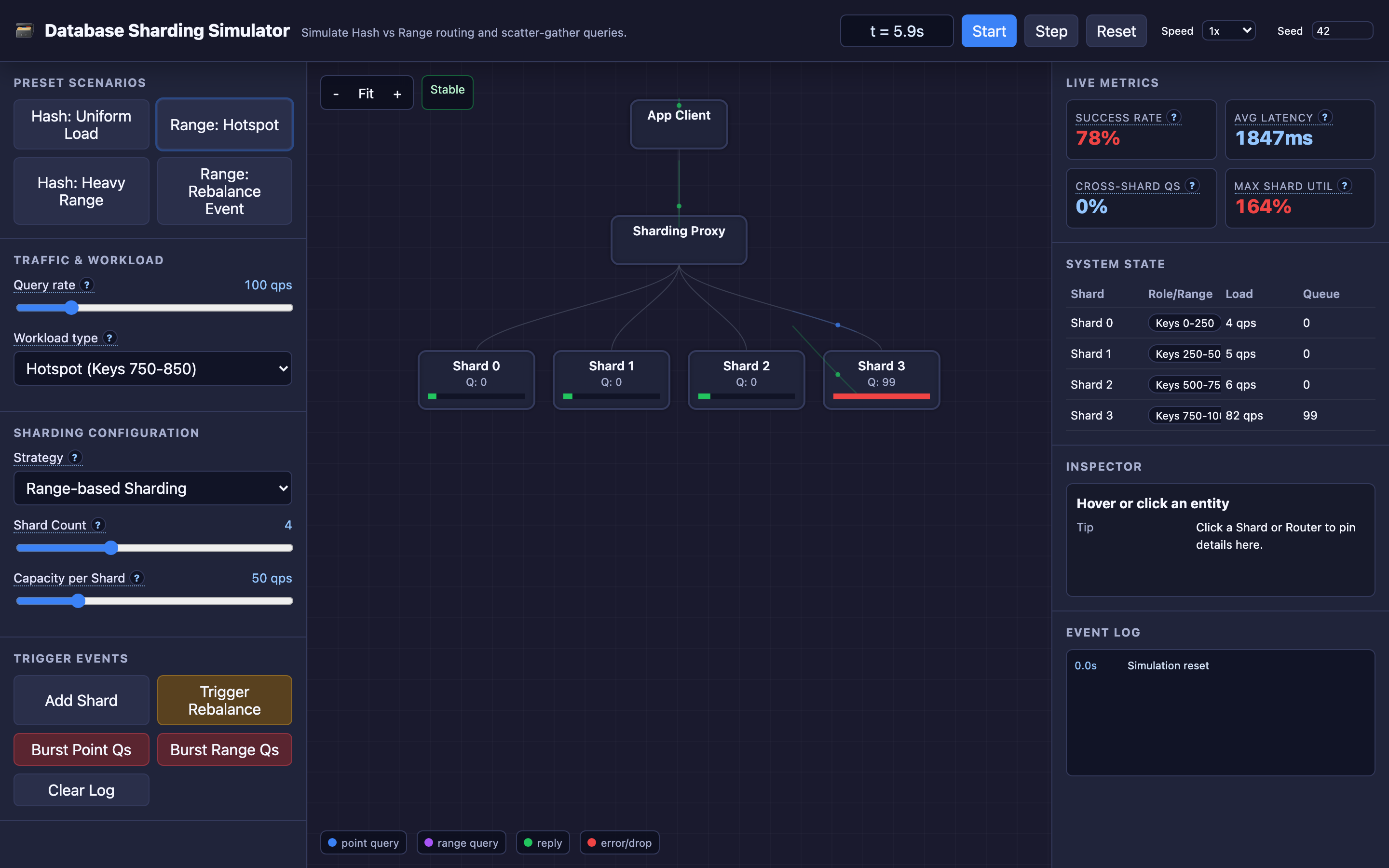
Sharding tradeoffs are impossible to internalize from documentation alone. You need to watch a hotspot form in real-time, see scatter-gather queries fan out to every shard, and trigger a rebalance to understand why virtual sharding matters.
Try the interactive Database Sharding demo → Start with “Hash: Uniform Load” to see ideal distribution, then switch to “Range: Hotspot” and watch a single shard’s queue overflow while three others sit empty.