How Databases Survive Hardware Failures Without Losing Data
Learn how database replication handles read scaling, failover, WAL streaming, replication lag, split-brain risk, and data loss tradeoffs.
Why this matters
Your primary database server runs on a single machine. It handles 5,000 writes per second and 25,000 reads per second for a SaaS platform with 50,000 active users. At 3:47 AM, the server’s RAID controller fails. The disk is gone.
If you don’t have replication, your Recovery Point Objective (RPO) depends entirely on your last backup — which ran 6 hours ago at 10 PM. Six hours of customer data, transactions, and activity are permanently lost.
Even with backups, recovery takes time. Restoring a 500GB PostgreSQL backup takes 45 minutes. Replaying WAL segments takes another 20. Your Recovery Time Objective (RTO) is now over an hour. For a platform processing financial transactions, that’s catastrophic — both for data integrity and for user trust.
Database replication solves this by maintaining one or more copies (replicas) of the primary database in real-time. Every transaction committed on the master is streamed to replicas, keeping them in sync. When the master fails, a replica is promoted to master within seconds. The question isn’t whether to replicate — it’s how to replicate: synchronously (zero data loss, higher write latency) or asynchronously (fast writes, potential data loss).
Practical note Replication is not backup, and failover is not free. The uncomfortable questions are always about stale reads, split-brain, and what data you can afford to lose.
The mental model
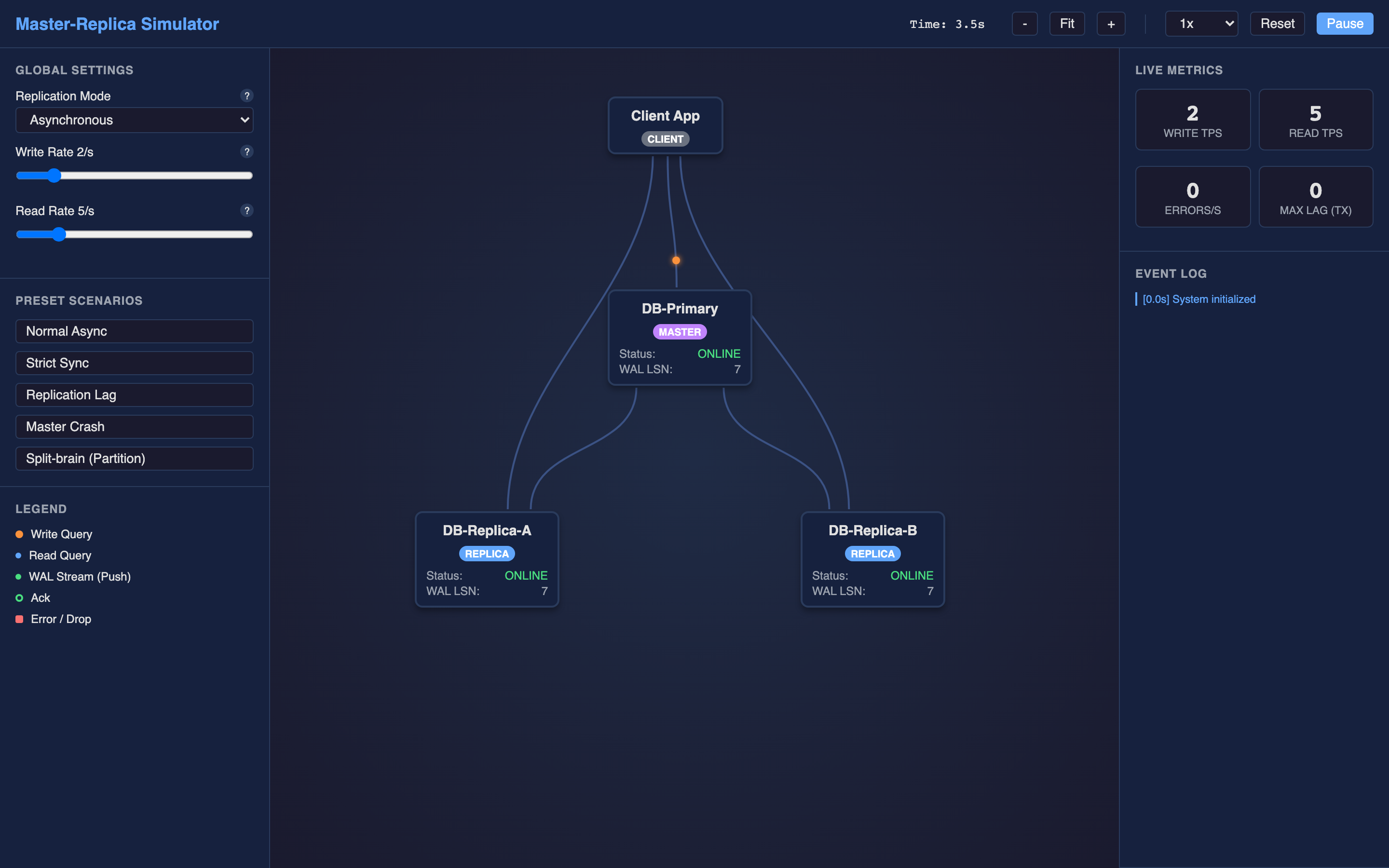
In a master-replica architecture, the client sends all write operations (INSERT, UPDATE, DELETE) to the master database. The master records each transaction in its Write-Ahead Log (WAL) — an append-only, sequential file that captures every change before it’s applied to the actual data pages. This WAL is the source of truth for replication.
The master continuously streams WAL records to each replica. In asynchronous replication, the master commits the transaction to the client immediately after writing to its local WAL, without waiting for replicas to acknowledge receipt. This is fast — write latency adds essentially zero overhead from replication — but if the master crashes before a replica processes the WAL, those transactions are lost.
In synchronous replication, the master waits for at least one replica to acknowledge that it has written the WAL records to its own durable storage before confirming the commit to the client. This guarantees zero data loss (RPO = 0) but adds network round-trip latency to every write. For a cross-datacenter setup with 10ms network latency, every write takes at least 10ms longer.
Semi-synchronous replication is the pragmatic middle ground: the master waits for one replica to acknowledge, then commits. If the designated sync replica becomes unresponsive, the master can fall back to async mode to avoid blocking writes entirely.
Read queries are distributed across replicas to offload the master, providing horizontal read scalability. But replicas may be behind the master by milliseconds to seconds (replication lag), so reads from replicas can return stale data. The TechViz simulator models this explicitly — watch WAL records (green) stream from master to replicas and observe how network latency creates divergence.
Decisions that matter
Replication Mode (Async / Sync / Semi-Sync)
The fundamental tradeoff knob. Async mode gives you the lowest write latency (sub-millisecond replication overhead) but risks losing the last N committed transactions if the master crashes. Sync mode guarantees durability at the cost of write latency equal to the slowest replica’s acknowledge time.
Semi-sync provides a balance — wait for one replica, accept the latency hit, but don’t wait for all of them.
-- PostgreSQL: Configure synchronous replication
ALTER SYSTEM SET synchronous_commit = 'on';
ALTER SYSTEM SET synchronous_standby_names = 'replica1';
SELECT pg_reload_conf();
Write Rate and Read Rate
Traffic volume controls that determine how quickly replication lag accumulates. At 1,000 writes/second with a 50ms network latency to replicas, the WAL buffer can queue up 50 transactions per acknowledgment cycle. High write rates amplify the consistency gap between master and replicas.
Network Latency (Per-Replica)
Inject artificial latency between the master and individual replicas. This simulates cross-datacenter replication (10–50ms), cross-region replication (100–200ms), or degraded network conditions. In synchronous mode, this directly increases write commit time. In async mode, it increases replication lag.
Failover Timeout
When the master goes offline, replicas detect the failure through a heartbeat mechanism. The failover timeout determines how long replicas wait before initiating promotion.
Set too short (2 seconds) and transient network blips trigger unnecessary failovers. Set too long (60 seconds) and you have a full minute of downtime.
Where it breaks: Replication Lag Serving Stale Reads
The failure mode: An e-commerce platform uses async replication with reads distributed to two replicas. A customer places an order (write to master), then immediately refreshes their order history page (read from replica). The replica is 800ms behind the master.
The order doesn’t appear. The customer panics and places the order again. Now they have duplicate orders and a support ticket.
What you will notice:
- Users report “missing” data that appears after refreshing a few seconds later
pg_stat_replicationshowsreplay_lagincreasing during peak write periods:
SELECT client_addr, replay_lag FROM pg_stat_replication;
-- client_addr  | replay_lag
-- 10.0.2.5     | 00:00:00.847
-- 10.0.2.6 | 00:00:01.203- Application logs show inconsistent reads: order created at t=0, order-not-found at t=0.2s, order found at t=1.5s
- Prometheus metric
pg_replication_lag_secondsexceeds SLA threshold
What I would do: Implement read-your-writes consistency at the application layer. After a write, route subsequent reads from that session to the master (or a sync replica) for a configurable window (e.g., 5 seconds).
Alternatively, include the write’s LSN (Log Sequence Number) in the session and only route reads to replicas that have replayed past that LSN. For critical paths like order confirmation, always read from the master.
Hint The interactive demo’s “Normal Async” preset demonstrates replication lag visually — watch WAL records queue up between master and replicas as you increase the write rate.
Where it breaks: Split-Brain During Network Partition
The failure mode: A network partition isolates the master from both replicas but not from the application servers. The replicas, unable to reach the master, initiate automatic failover and promote Replica A as the new master.
Now there are two active masters accepting writes. The application servers on side A write to the promoted replica. The application servers on side B continue writing to the original master. When the partition heals, the databases have divergent transaction histories — conflicting updates to the same rows, unique constraint violations, and irreconcilable data.
What you will notice:
- Two nodes report
pg_is_in_recovery = falsesimultaneously — both believe they are the master - Write conflicts appear after partition heals:
ERROR: duplicate key value violates unique constraint pg_stat_wal_receivershows no active WAL receiver on the original master — it’s not receiving from anyone- Application logs show successful writes to both endpoints during the partition window
- Data reconciliation queries reveal different values for the same primary key on the two nodes
Warning Split-brain is the most dangerous failure mode in replication. Two masters accepting writes simultaneously can cause irreconcilable data divergence that no automated tool can fix.
What I would do: Implement fencing to prevent the old master from accepting writes after a failover. Use STONITH (Shoot The Other Node In The Head) — when a replica is promoted, the old master’s storage is fenced off or the node is forcibly rebooted. In cloud environments, revoke the old master’s security group access.
Additionally, use a quorum-based system: require a majority of nodes (2 out of 3) to agree before promoting a replica. If the isolated master can’t reach a quorum, it voluntarily demotes itself to read-only.
# Patroni configuration for PostgreSQL HA with fencing
bootstrap:
  dcs:
    ttl: 30
    loop_wait: 10
    maximum_lag_on_failover: 1048576  # 1MB max lag for promotion
    postgresql:
      parameters:
        wal_level: replica
        max_wal_senders: 5
Where it breaks: WAL Accumulation on Slow Replicas
The failure mode: Replica B has a degraded disk (write throughput dropped from 500MB/s to 50MB/s due to a failing SSD). It falls behind on WAL replay. The master continues generating WAL segments at 100MB/minute.
After 4 hours, the master has accumulated 24GB of unshipped WAL files. The master’s disk — provisioned with 50GB of WAL space — is now at 48% WAL utilization and climbing. If it reaches 100%, PostgreSQL pauses all writes to prevent WAL wrap-around, effectively causing a self-imposed outage.
What you will notice:
pg_stat_replicationshowssent_lsnfar ahead ofreplay_lsnfor the slow replica- Master disk utilization alert fires:
node_filesystem_avail_bytes{mountpoint="/var/lib/postgresql/pg_wal"} < 10GB - WAL file count on master increases linearly:
ls -la /var/lib/postgresql/14/main/pg_wal/ | wc -lshows hundreds of unarchived segments - PostgreSQL logs:
WARNING: oldest WAL segment is older than checkpoint_warning (30s) - Write throughput on master begins to stutter as checkpoint frequency increases
What I would do: Configure wal_keep_size (PostgreSQL 13+) to limit retained WAL, and set up WAL archiving to external storage (S3, GCS) so replicas can catch up from archive rather than requiring the master to retain all segments.
Monitor replication lag aggressively — alert at 30 seconds, page at 2 minutes. If a replica falls too far behind, disconnect it, rebuild it from a fresh base backup, and reconnect. Set max_slot_wal_keep_size to cap how much WAL a replication slot can retain.
-- PostgreSQL: Limit WAL retention and enable archiving
ALTER SYSTEM SET wal_keep_size = '2GB';
ALTER SYSTEM SET max_slot_wal_keep_size = '5GB';
ALTER SYSTEM SET archive_mode = 'on';
ALTER SYSTEM SET archive_command = 'aws s3 cp %p s3://wal-archive/%f';
The tradeoff
| Approach | Pros | Cons |
|---|---|---|
| Asynchronous replication | Lowest write latency (\<1ms overhead), no dependency on replica health | Data loss on master crash (last N transactions), stale reads |
| Synchronous replication | Zero data loss (RPO = 0), strong consistency | Write latency increases by network RTT, single slow replica blocks all writes |
| Semi-synchronous replication | Balanced — waits for 1 replica, falls back to async if unavailable | More complex configuration, potential mode-switching surprises |
| Automatic failover | Fast recovery (RTO < 30s), minimal manual intervention | Risk of false positives (unnecessary failovers), split-brain scenarios |
| Manual failover | No false positive risk, operator validates state before promotion | Slow recovery (RTO depends on human response time), requires on-call expertise |
| Single replica | Lower infrastructure cost, simpler topology | No redundancy if replica fails, limited read scalability |
| Multiple replicas (3+) | Higher read throughput, quorum-based decisions, geographic distribution | Higher storage cost, more complex WAL distribution, consistency lag varies per replica |
Hint Start with semi-synchronous replication and automatic failover using Patroni. This gives you zero data loss for the sync replica, fast recovery on master failure, and quorum-based promotion to prevent split-brain.
A practical checklist
Step 1: Check replication status and lag. This is always the first diagnostic step:
-- PostgreSQL
SELECT pid, client_addr, state, sent_lsn, replay_lsn,
       (sent_lsn - replay_lsn) AS byte_lag,
       replay_lag
FROM pg_stat_replication;
Step 2: Identify WAL accumulation. Check how much WAL the master is retaining:
du -sh /var/lib/postgresql/14/main/pg_wal/
ls -lt /var/lib/postgresql/14/main/pg_wal/ | head -5
Step 3: Validate there’s no split-brain. Confirm only one node is accepting writes:
-- Run on each node
SELECT pg_is_in_recovery();  -- Should be 'true' on all replicas, 'false' only on master
Step 4: Test failover in a controlled environment. Use the TechViz simulator’s “Master Crash” preset to watch the promotion process, then practice on a staging cluster before you need it in production.
Step 5: Set up comprehensive monitoring. Track these Prometheus metrics at minimum:
# Replication lag in seconds
pg_replication_lag_seconds > 5  # Alert threshold

# WAL disk usage
node_filesystem_avail_bytes{mountpoint="/pg_wal"} < 5e9  # Alert at 5GB remaining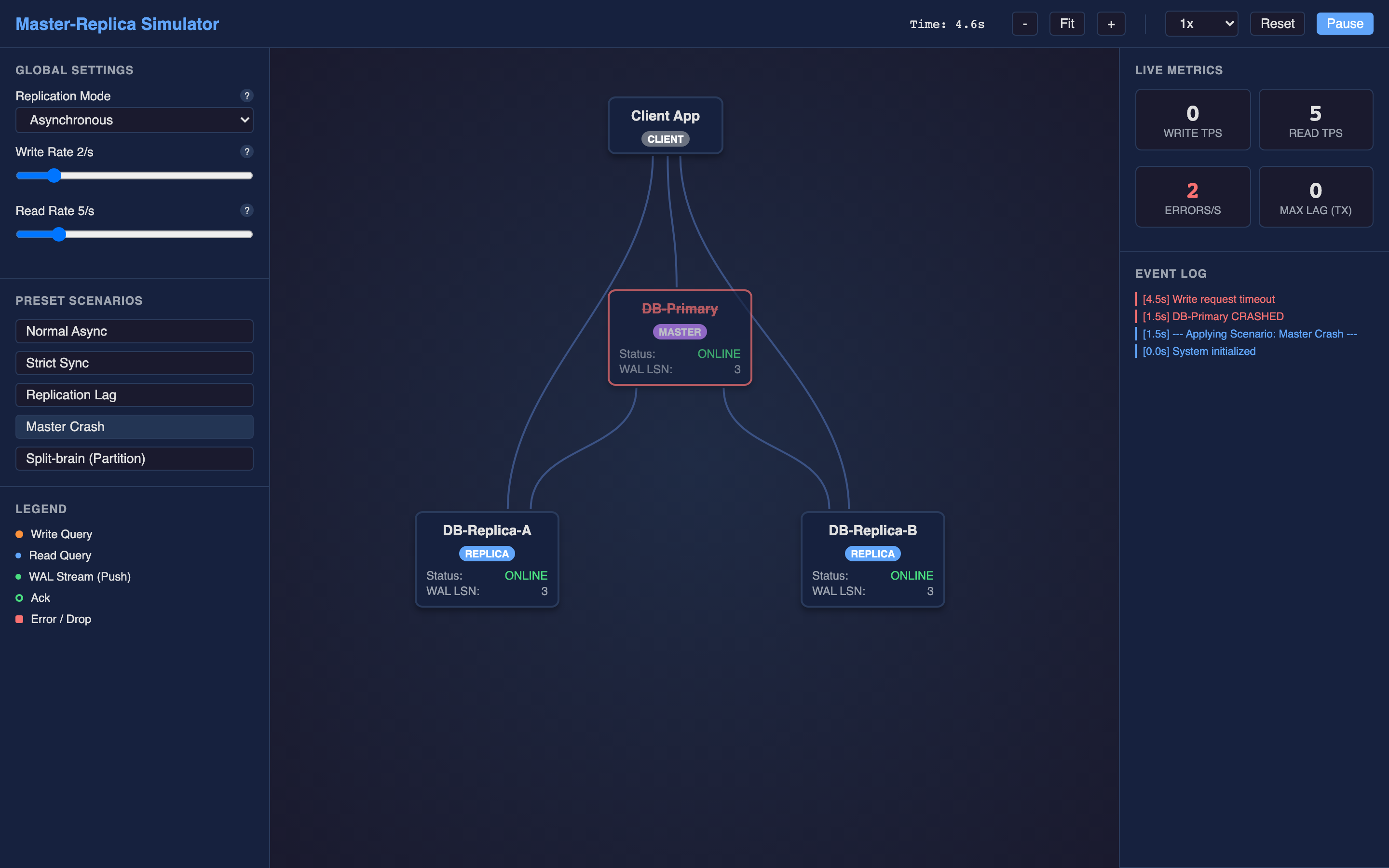
Try it yourself
Replication lag, failover timing, and split-brain scenarios are much easier to understand when you can watch WAL records stream from master to replicas in real-time. The TechViz simulator lets you switch between async, sync, and semi-sync modes, crash the master, trigger failover, and create network partitions.
Try the interactive Database Replication demo → Start with the “Normal Async” preset to see baseline behavior, then trigger the “Network Partition (Split-brain)” scenario to watch two masters accept conflicting writes.