Consistent Hashing: Surviving Cache Node Failures
Learn how consistent hashing, hash rings, virtual nodes, and bounded load reduce cache movement and hotspots when nodes join or fail.
Why this matters
Imagine you’re running a Memcached cluster with 8 nodes, caching 10 million user session objects. The straightforward approach is modular hashing: node = hash(session_id) % 8. This distributes keys evenly. Then node 5 crashes at 2 AM.
Now your hash function becomes hash(session_id) % 7. This doesn’t just move node 5’s keys — it remaps roughly 87.5% of all keys to different nodes. Ten million cache lookups suddenly miss. Your database, which was comfortably handling 2,000 queries per second behind the cache, is instantly hammered with 800,000 queries per second.
Response times spike from 15ms to 8,000ms. The database connection pool fills up. Your entire service goes down — not because of one dead cache node, but because of a rehashing storm.
This is the fundamental problem consistent hashing solves. When a node leaves or joins, consistent hashing remaps only K/N keys (where K is total keys and N is total nodes) instead of nearly all of them. For our 10-million-key cluster, that’s roughly 1.25 million keys affected instead of 8.75 million — a 7× reduction in cache invalidation.
My rule of thumb Consistent hashing solves movement, not fairness. You still need virtual nodes, load bounds, and a plan for hot keys.
The mental model
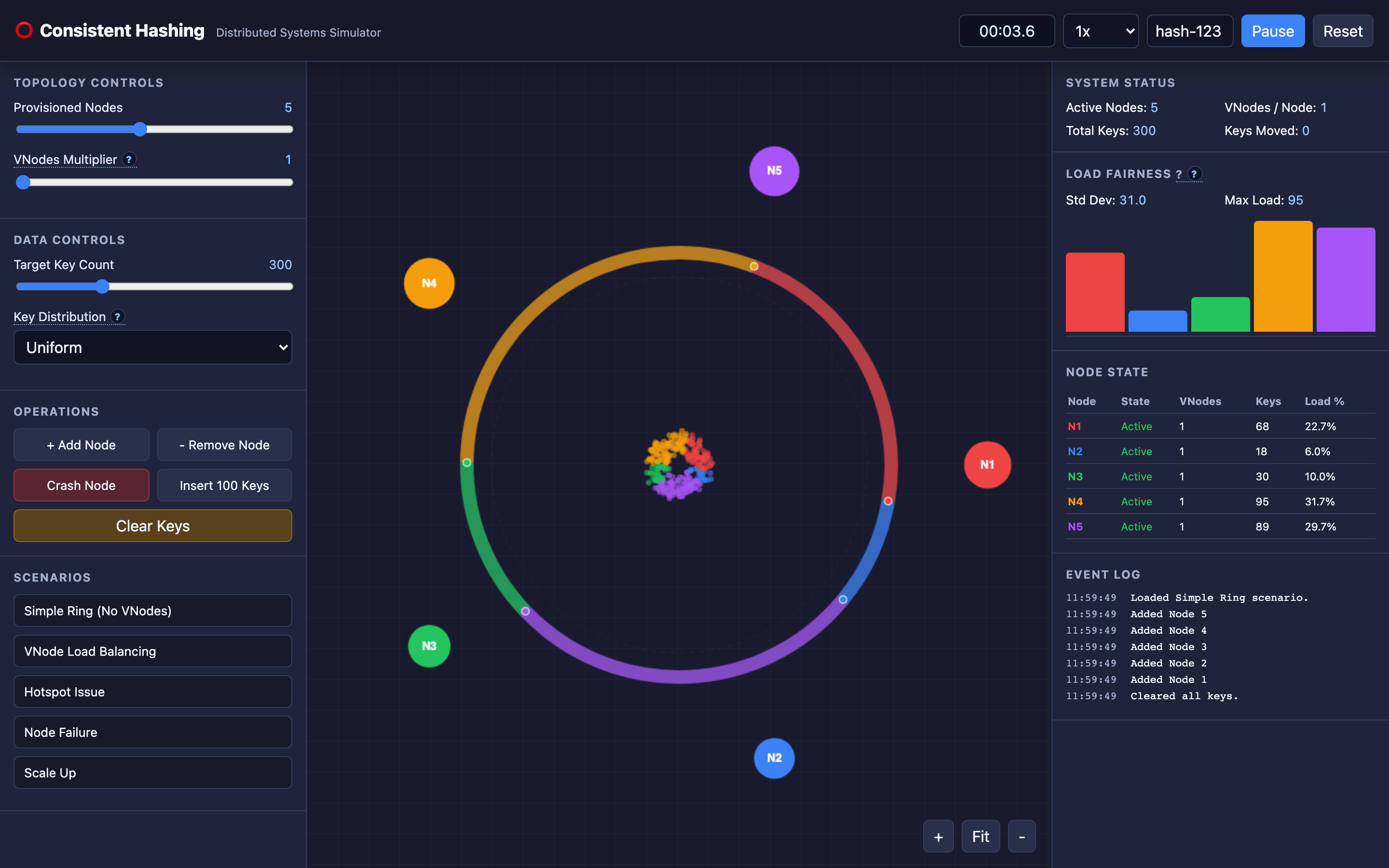
Consistent hashing maps both nodes and keys onto a circular keyspace — a hash ring representing the range from 0 to 2³²−1 (visualized as a 360-degree circle in the TechViz simulator). Each node is placed on the ring at the position determined by hashing its identifier (e.g., hash("cache-node-3")). Each key is similarly hashed and placed on the ring.
A key is assigned to the first node encountered moving clockwise around the ring. This is the node responsible for storing that key’s data. When a node is added, it only “steals” keys from its immediate clockwise neighbor — all other key-to-node mappings remain unchanged. When a node crashes, its keys fall to its immediate clockwise neighbor, not to every node in the cluster.
The elegance is in the math: adding or removing a node only affects the arc of the ring between the new/removed node and its counter-clockwise neighbor. Every other key stays where it was.
However, basic consistent hashing has a statistical problem. With only 8 points on a ring representing 8 nodes, the arcs between nodes can vary wildly. One node might own 35% of the ring while another owns 5%. This is where virtual nodes (vnodes) come in.
Instead of placing each physical node at one point on the ring, you place it at 150–200 points. With 8 nodes × 150 vnodes = 1,200 points on the ring, the statistical distribution becomes nearly uniform.
Decisions that matter
Provisioned Nodes (Physical Server Count)
The number of physical servers in the cluster. With fewer nodes (3–4), each node handles a larger share of the keyspace. Adding a node to a 4-node cluster remaps ~25% of keys; adding to a 20-node cluster remaps only ~5%.
The interactive demo lets you add and remove nodes in real-time to observe the data migration patterns.
VNodes Multiplier
How many virtual points each physical node gets on the ring. At a multiplier of 1, each node has a single position — load distribution is uneven, with standard deviation of ~40% across nodes. At a multiplier of 150, the standard deviation drops below 5%.
The tradeoff: each vnode requires memory for its ring position and routing metadata. At 200 vnodes per node × 100 nodes = 20,000 ring entries, consuming roughly 1.5MB of memory in the routing table.
# How virtual nodes work in practice
def get_ring_positions(node_id, vnode_count):
    positions = []
    for i in range(vnode_count):
        virtual_key = f"{node_id}#vnode{i}"
        position = hash(virtual_key) % (2**32)
        positions.append(position)
    return positions
Key Distribution (Uniform vs. Hotspot)
Switch between uniformly distributed key hashes and a Zipf-like distribution where a small set of keys receives disproportionate traffic. Under Zipf distribution (common in real workloads — think trending tweets or viral product pages), even consistent hashing with vnodes can produce hotspots when popular keys cluster in the same ring segment.
Hash Ring Lookup Complexity
The ring is typically implemented as a sorted array of node positions. Key lookup uses binary search: O(log N) where N is the total number of vnodes on the ring. For 100 nodes × 150 vnodes = 15,000 positions, that’s ~14 comparisons per lookup — under 1 microsecond.
Some implementations use jump hashing for O(1) lookup, but this sacrifices the ability to handle heterogeneous node weights.
Where it breaks: Hot Spotting from Uneven Distribution
The failure mode: A 5-node cluster is configured with a vnode multiplier of 1 (no virtual nodes). Due to the randomness of hashing, Node A ends up owning 38% of the ring while Node E owns only 8%.
Under uniform traffic, Node A receives 4.75× more requests than Node E. Node A’s memory fills up, evictions begin, and cache hit rates drop from 95% to 60% — but only for keys mapped to Node A. Users whose session data happens to land on Node A experience 200ms response times while everyone else sees 15ms.
What you will notice:
- Monitoring shows wildly uneven memory utilization across cache nodes:
memcached_current_bytesvaries by 4–5× across instances - Cache hit rate (
memcached_get_hits / memcached_cmd_get) diverges per node — some nodes at 95%, others at 60% - CPU utilization is skewed: one node at 80%, others at 15%
- No single key is “hot” — the problem is at the ring segment level, not the key level
What I would do: Increase the vnode multiplier to 100–200. This spreads each physical node’s responsibility across many ring segments, smoothing out statistical variance. With 150 vnodes, the maximum load difference between any two nodes drops from 4–5× to under 1.2×.
Hint The interactive demo’s “VNode Load Balancing” preset demonstrates this directly — toggle the vnode count and watch the load bars equalize.
Where it breaks: Cascading Node Crashes from Neighbor Overload
The failure mode: In a 6-node cluster, Node C crashes. Consistent hashing correctly remaps Node C’s keys (roughly 16.7% of the total) to Node D, its clockwise neighbor. But Node D was already at 75% capacity.
Adding 16.7% more keys pushes it to ~92% capacity. Evictions spike, latency doubles, and Node D’s health check starts failing. Now Node D crashes, and its combined load (its original keys + Node C’s keys — roughly 33% of total traffic) cascades to Node E. This chain reaction can take down the entire cluster in under 2 minutes.
What you will notice:
- Sequential node failures in monitoring: Node C down at t=0, Node D at t=45s, Node E at t=90s
- Each subsequent failure increases the load on the next neighbor by a larger percentage
- Cache eviction rates accelerate exponentially:
memcached_evictionsgraph shows a hockey stick - Network bandwidth spikes as clients refetch evicted data from the database
What I would do: Implement bounded load consistent hashing (Google’s 2016 algorithm). Set a maximum load per node at (1 + ε) × average_load where ε is typically 0.25. When a node reaches its bound, new keys are redirected to the next node on the ring. This prevents any single node from absorbing an unmanageable share.
Additionally, maintain a replication factor of 2–3 so that when a node dies, its keys are already warm on replica nodes.
Warning Without bounded load, a single node failure can cascade through the entire ring. Always pair consistent hashing with a load cap in production clusters.
Where it breaks: Rehashing Storms When Cluster Size Changes
The failure mode: An auto-scaling policy adds 3 new nodes simultaneously to a 10-node cluster during a traffic spike. Each new node steals keys from its clockwise neighbor. With 3 nodes joining at once, approximately 23% of keys are remapped — 2.3 million keys in a 10-million-key cluster.
These remapped keys become instant cache misses. The database receives 2.3 million unexpected queries in a 30-second window. Database CPU hits 100%, connection pool exhausts, and the application starts returning 503 errors.
What you will notice:
- Cache hit rate drops sharply (from 95% to 72%) immediately after scaling event
- Database query rate spikes by 3–5× within seconds of new nodes joining
- New cache nodes show 0% hit rate while old nodes show normal rates
- Application error logs:
ConnectionPoolExhausted: Unable to acquire connection from pool within 5000ms
What I would do: Never add multiple nodes simultaneously. Add one node at a time with a pre-warming phase: before the new node accepts live traffic, backfill its key range from the database or from the neighbor node’s data. Tools like redis-cli --cluster rebalance handle this for Redis Cluster.
Set auto-scaling cooldown periods to at least 5 minutes between node additions. Monitor cache_miss_rate during scaling events and pause scaling if misses exceed 30%.
The tradeoff
| Approach | Pros | Cons |
|---|---|---|
| No virtual nodes (multiplier = 1) | Minimal memory overhead, simple routing table | Load imbalance up to 5× between nodes |
| High vnode count (100–200) | Near-uniform load distribution, \<5% variance | 1–2MB routing table memory, longer ring rebuild on topology change |
| O(log N) binary search on ring | Standard implementation, handles heterogeneous weights | Slightly slower than O(1) for very large clusters |
| O(1) jump consistent hashing | Fastest lookup, zero memory overhead | Cannot handle weighted nodes or arbitrary removal |
| Bounded load algorithm | Prevents cascading node failures | Slightly more complex routing, may redirect keys away from “optimal” node |
| Replication factor = 1 (no replicas) | Minimal storage cost, simple consistency | Single node failure causes cold cache for its entire key range |
| Replication factor = 3 | Warm replicas ready on node failure, read scalability | 3× storage cost, consistency challenges on writes |
Hint For most production clusters, start with a vnode multiplier of 150 and a replication factor of 3. This combination handles both uneven distribution and node failures gracefully.
A practical checklist
Step 1: Measure load distribution across nodes. Before tuning, understand the current state. Query per-node metrics:
# For Memcached
echo "stats" | nc cache-node-1 11211 | grep "cmd_get\|bytes\|curr_items"
# For Redis Cluster
redis-cli --cluster info 10.0.1.1:6379
Step 2: Calculate the load imbalance ratio. Divide the most-loaded node’s key count by the least-loaded node’s key count. If this ratio exceeds 1.5, vnode count is too low.
Step 3: Increase vnodes gradually. Don’t jump from 1 to 200. Increase in steps (1 → 50 → 100 → 150) and measure the redistribution impact at each step. Each increase remaps some keys, so treat it like a rolling deployment.
Step 4: Implement pre-warming for new nodes. Before routing traffic to a new node, populate it with its expected key range:
# Redis Cluster example: rebalance slots to new node
redis-cli --cluster rebalance 10.0.1.1:6379 --cluster-use-empty-masters
Step 5: Monitor during topology changes. Set up Grafana alerts on cache miss rate during scaling events:
# Alert if cache hit rate drops below 80% for 2 minutes
(rate(cache_hits_total[2m]) / rate(cache_requests_total[2m])) < 0.80
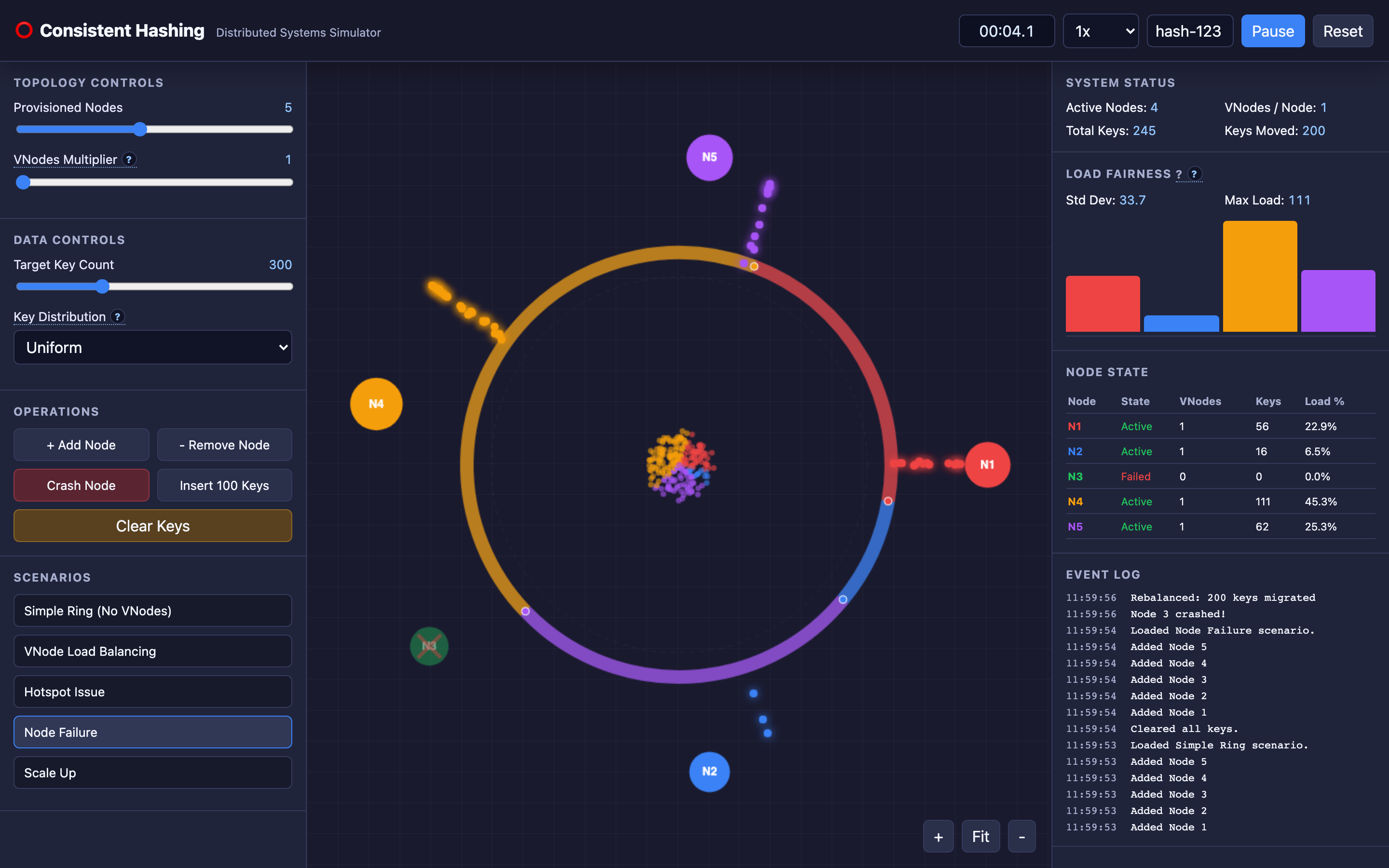
Step 6: Use the “Node Failure” preset in the interactive demo. Crash a node and watch which keys migrate. Compare behavior with vnode multiplier at 1 versus 150. This builds intuition faster than reading documentation.
Try it yourself
Consistent hashing is inherently visual: keys map to ring positions, arcs define ownership, and load bars reveal skew. Use the interactive demo to add and remove nodes, toggle virtual nodes, inject hotspot traffic, and compare which keys migrate during each topology change.
Try the interactive Consistent Hashing demo → Start with the “Node Failure” preset to watch how consistent hashing limits data migration, then switch to “VNode Load Balancing” to see virtual nodes eliminate hotspots in real-time.