Why Your Database Query Went from 2ms to 2 Seconds
Learn how B-Tree indexes speed up database queries, why full table scans happen, and how fragmentation or over-indexing hurts writes.
Why this matters
Your users table has 10 million rows. A query that used to return in 2ms is now taking 2,100ms. Nothing changed in the application code. But last week, someone dropped an index during a migration cleanup, and now SELECT * FROM users WHERE email = 'jane@example.com' does a sequential scan across every single 8KB page in the table.
A 10-million-row table with an average row size of 200 bytes occupies roughly 250,000 heap pages. At ~0.1ms per page read from SSD (or 10ms from spinning disk), a full table scan costs 25 seconds on SSD and catastrophically more on HDD.
With a B-Tree index on email, the same lookup descends 3–4 levels of the tree and reads 4 pages total — taking about 0.4ms. The performance difference is 5,000×.
Yet most developers treat indexes as an afterthought, adding them reactively when a query is already slow in production. Understanding how B-Trees organize data, how page splits fragment your index, and when indexes actually hurt performance is essential for anyone working with relational databases.
My rule of thumb Indexes are not a yes-or-no optimization. Every index is a read shortcut that charges rent on writes, storage, and maintenance.
The mental model
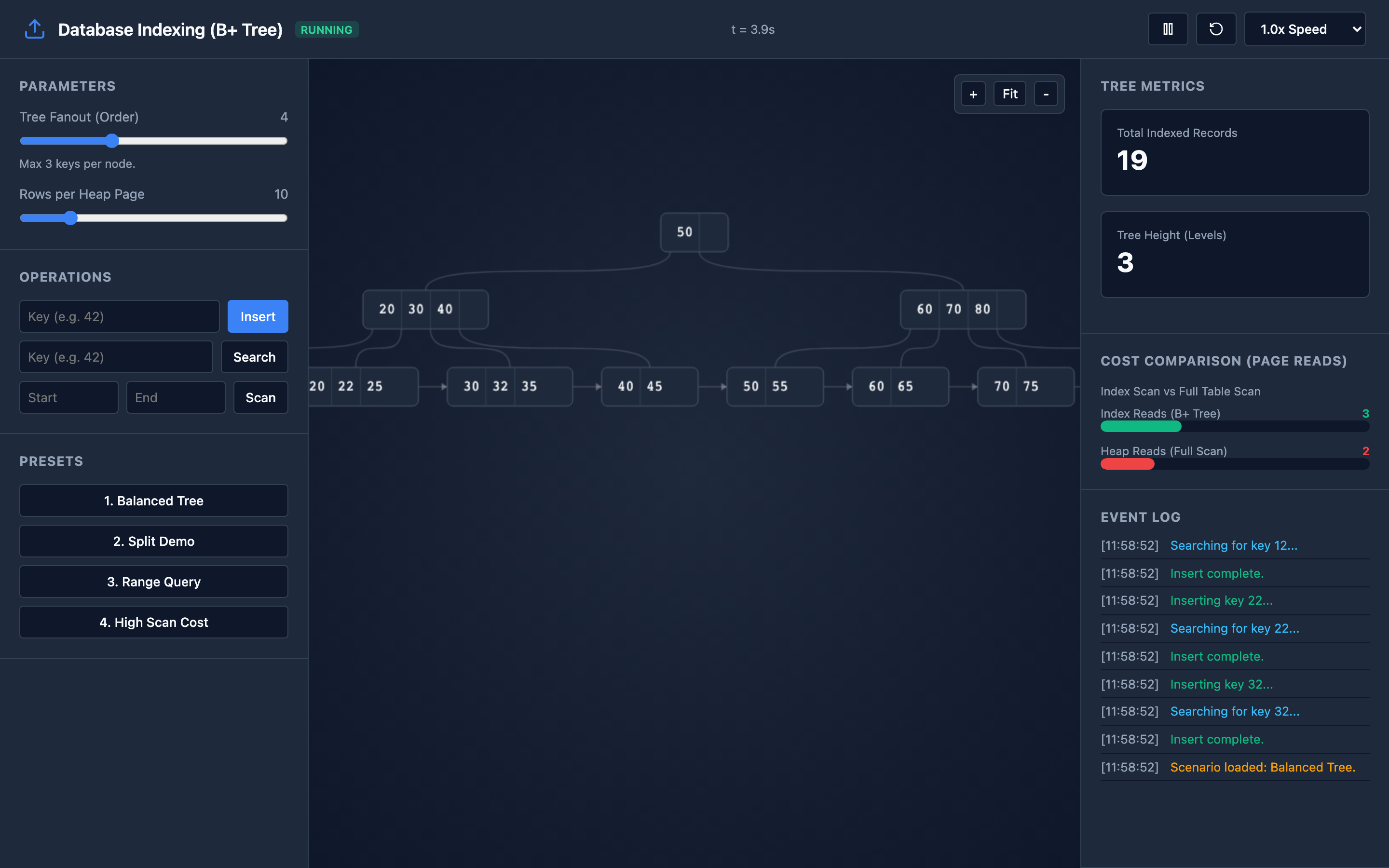
A B-Tree index is a balanced tree structure where every leaf node is the same distance from the root. Each node is a page — typically 8KB in PostgreSQL, 16KB in InnoDB. The key mechanic is fanout: each internal page holds separator keys and child pointers. With a fanout of 200 (typical for integer keys), a 3-level tree can index 200³ = 8 million rows.
Point Lookup: To find email = 'jane@example.com', the database reads the root page, compares the search key against separator keys, and follows the child pointer to the correct internal page. This repeats at each level until reaching a leaf page, where the actual key-to-row-pointer mapping lives. Total page reads: equal to the tree height (typically 3–4 for tables up to ~100 million rows).
Range Scan: B-Trees use a B+ Tree variant where leaf pages are linked together in a doubly-linked list. To execute WHERE created_at BETWEEN '2026-01-01' AND '2026-03-31', the database seeks to the first matching leaf, then follows the linked list sequentially through all matching leaves. No need to re-traverse from the root for each row.
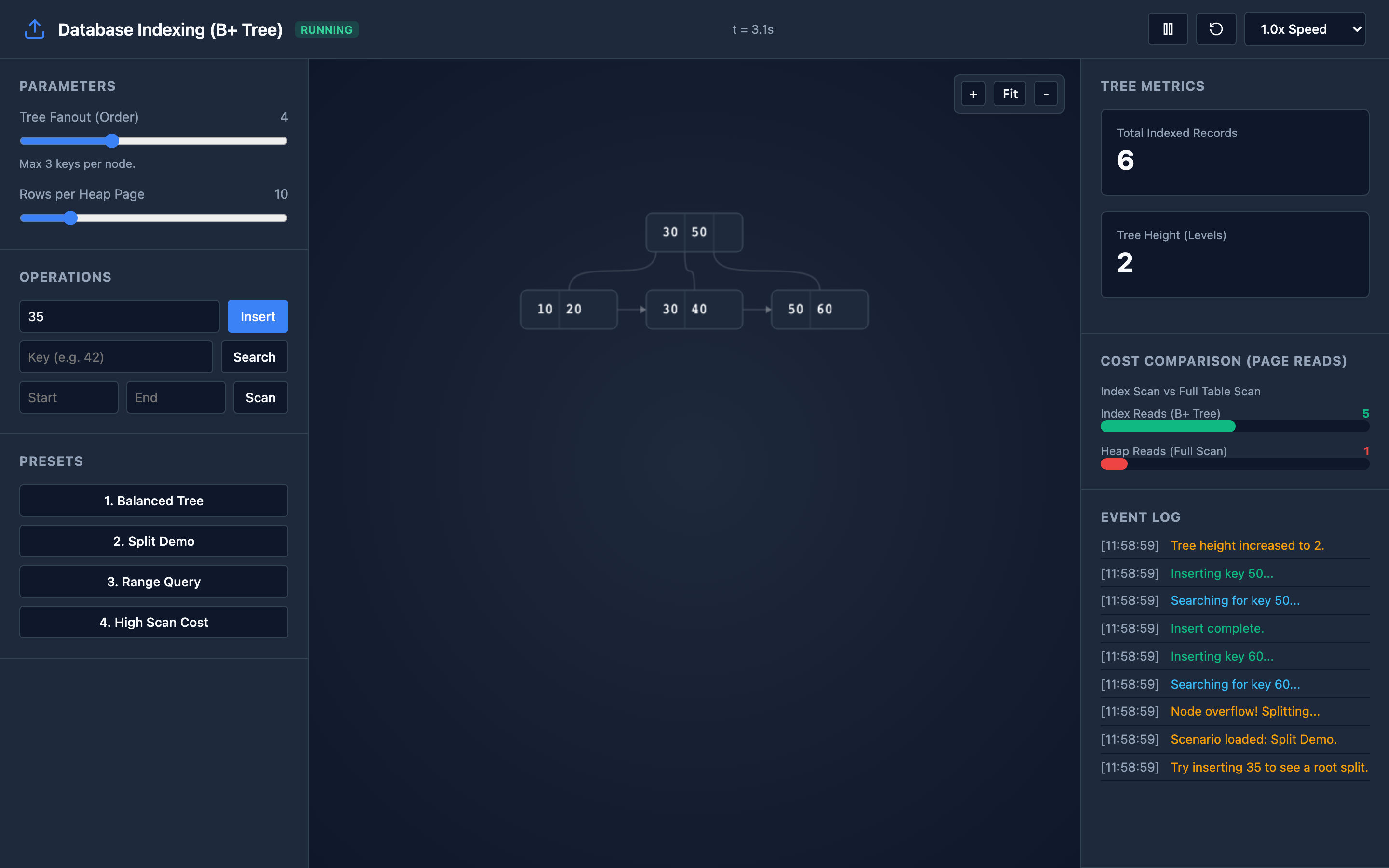
Insert and Page Splits: When inserting a new key into a full leaf page, the database splits the page — allocating a new page, distributing half the keys to each, and promoting a separator key to the parent. If the parent is also full, the split cascades upward. In extreme cases, the root splits and a new root is created, increasing tree height by 1.
Cost Comparison: The interactive demo tracks index page reads against estimated full heap scan pages. For a table with 1 million rows at 100 rows per heap page, a full scan reads ~10,000 pages. An indexed lookup reads ~3 pages. That’s a 3,333× difference.
Decisions that matter
Page Fanout (keys per page): Determined by key size and page size. Integer keys (4 bytes) with 8KB pages give a fanout of ~500. Variable-length varchar(255) keys with average length 50 bytes give a fanout of ~80.
Lower fanout means a taller tree and more page reads per lookup. You control this indirectly by choosing appropriate key types — prefer integer or bigint over text for indexed columns when possible.
Rows per Heap Page: Controls how many table rows fit in a single disk page. With 100-byte rows, you get ~80 rows per 8KB page. With 2,000-byte rows (lots of text columns), you get ~4 rows per page. Fewer rows per page means more pages to scan in a full table scan — making indexes even more critical for wide tables.
Fill Factor (50–100%): The percentage of each index page that is filled during initial creation or REINDEX. A fill factor of 90% leaves 10% space for future inserts before a page split is needed. Lower fill factors reduce splits but waste space. PostgreSQL default is 90%.
Index Type (B-Tree vs. Hash vs. GIN vs. GiST): B-Tree is the default and handles equality and range queries. Hash indexes are faster for pure equality but don’t support range scans or sorting. Choose B-Tree unless you have a specific use case (full-text search → GIN, geometric data → GiST).
Composite Index Column Order: A composite index on (country, city, zip) efficiently serves queries filtering on country, country + city, or country + city + zip — but NOT city alone. The leftmost prefix rule means column order in composite indexes is critical. Put the most selective (highest cardinality) column first for equality predicates, or the range column last.
Hint The interactive demo lets you build composite indexes and test different column orders. Try querying on the second column alone to see the leftmost prefix rule in action.
Where it breaks: Full Table Scan on a Missing Index
The failure mode: A developer writes SELECT * FROM orders WHERE customer_email = 'user@corp.com' on a 50-million-row orders table. There’s no index on customer_email. PostgreSQL’s query planner chooses a sequential scan — reading all 625,000 heap pages (at 80 rows/page). The query takes 12 seconds.
Under concurrent load with 20 similar queries, the database saturates disk I/O, and p99 latency for all queries spikes to 30 seconds.
What you will notice: EXPLAIN ANALYZE shows Seq Scan on orders with actual time=0.015..12340.567. The rows estimate might be accurate but the planner chose a seq scan because no index exists.
In pg_stat_user_tables, seq_scan count for the table is incrementing rapidly while idx_scan is zero. Prometheus pg_stat_activity shows queries in active state for 10+ seconds.
What I would do: Create the missing index — but do it without locking the table:
-- Create index without blocking writes (PostgreSQL)
CREATE INDEX CONCURRENTLY idx_orders_customer_email
  ON orders (customer_email);

-- Verify the index is used
EXPLAIN ANALYZE
  SELECT * FROM orders WHERE customer_email = 'user@corp.com';
-- Expected: Index Scan using idx_orders_customer_email
-- Expected: actual time=0.023..0.089 rows=3
After index creation, verify with EXPLAIN ANALYZE that the planner switches from Seq Scan to Index Scan. If it doesn’t, check if table statistics are stale and run ANALYZE orders.
Where it breaks: Page Splits and Index Fragmentation
The failure mode: Your orders table uses a UUID primary key (uuid_generate_v4()). UUIDs are random, so inserts scatter across the entire B-Tree rather than appending to the rightmost leaf. Every insert has a high probability of hitting a full leaf page, causing a split.
After 20 million inserts, the index is 40% larger than it needs to be due to half-filled pages from splits. Index scans that used to read 3 pages now read 5 due to increased tree height.
What you will notice: The pg_relation_size('idx_orders_pkey') is significantly larger than expected. The pgstattuple extension shows high avg_leaf_density below 70% and elevated dead_tuples.
Index-only scans become slower over time even though row count grows linearly. Sequential I/O patterns degrade because fragmented pages are no longer contiguous on disk.
Warning Using
UUIDv4as a primary key causes random insert patterns that lead to constant page splits and index bloat. ConsiderUUIDv7(time-ordered) for sequential insert behavior.
What I would do: Periodically rebuild the index to reclaim space and restore contiguity:
-- Rebuild index without locking (PostgreSQL 12+)
REINDEX INDEX CONCURRENTLY idx_orders_pkey;

-- Check fragmentation metrics
SELECT * FROM pgstattuple('idx_orders_pkey');
-- Look for avg_leaf_density < 70% as a trigger to reindex
Better yet, consider using UUIDv7 (time-ordered UUIDs) instead of UUIDv4. UUIDv7 keys are monotonically increasing, so inserts always append to the rightmost leaf — eliminating random page splits entirely.
Where it breaks: Index Bloat from Over-Indexing
The failure mode: A well-meaning DBA creates indexes on every column that appears in a WHERE clause: 12 indexes on a single table. Each INSERT now updates all 12 indexes. Write throughput drops from 5,000 inserts/second to 800 inserts/second.
The indexes collectively consume 3× more disk space than the table data itself. VACUUM takes 45 minutes because it must clean dead tuples from all 12 indexes.
What you will notice: pg_stat_user_indexes shows several indexes with idx_scan = 0 — they were created but never used by any query. INSERT and UPDATE latency increases linearly with the number of indexes.
pg_total_relation_size far exceeds pg_relation_size for the table (the difference is index storage). VACUUM VERBOSE output shows most time spent on index cleanup.
What I would do: Audit your indexes for actual usage:
-- Find unused indexes (PostgreSQL)
SELECT schemaname, tablename, indexname, idx_scan,
       pg_size_pretty(pg_relation_size(indexrelid)) as size
FROM pg_stat_user_indexes
WHERE idx_scan = 0
  AND indexrelid NOT IN (
    SELECT indexrelid FROM pg_constraint WHERE contype = 'p'
  )
ORDER BY pg_relation_size(indexrelid) DESC;

-- Drop unused indexes
DROP INDEX CONCURRENTLY idx_orders_unused_column;
Use composite indexes to cover multiple query patterns with a single index. An index on (status, created_at) serves queries on status alone, and status + created_at — replacing two separate indexes with one.
The tradeoff
| Approach | Pros | Cons |
|---|---|---|
| B-Tree index on every queried column | Fast reads for all query patterns | Write throughput drops ~20% per added index, disk usage grows |
| Composite index (multi-column) | One index serves multiple query patterns | Column order matters (leftmost prefix), harder to design |
| No index (full table scan) | Zero write overhead, simpler schema | Read latency grows linearly with table size — O(N) vs O(log N) |
| Low fill factor (70%) | Fewer page splits, better insert performance | 30% more disk space, more pages to read during scans |
| High fill factor (100%) | Minimal disk usage, fewer pages to read | Every insert into a full page triggers a split |
| UUIDv7 (time-ordered) primary key | Sequential inserts, minimal splits, append-only | Less randomness for sharding, slight clock dependency |
| UUIDv4 (random) primary key | Good shard distribution, no clock dependency | Random insert pattern causes constant page splits and fragmentation |
Hint After the tradeoffs table above, the general recommendation is: start with no indexes, use
EXPLAIN ANALYZEto identify slow queries, then add targeted B-Tree indexes. Prefer composite indexes over multiple single-column indexes.
A practical checklist
Step 1: Always start with EXPLAIN ANALYZE. Don’t guess — let the query planner tell you what it’s doing. Look for Seq Scan on large tables, Sort operations not backed by an index, and actual rows dramatically different from estimated rows (which indicates stale statistics).
EXPLAIN (ANALYZE, BUFFERS, FORMAT TEXT)
  SELECT * FROM orders WHERE customer_email = 'user@corp.com';
Step 2: Check buffer hits vs. disk reads. The BUFFERS option in EXPLAIN ANALYZE shows shared hit (read from buffer pool) vs. shared read (read from disk). If most reads are disk reads, your shared_buffers setting might be too small for your working set.
Step 3: Monitor index usage over time. Query pg_stat_user_indexes weekly. Any index with idx_scan = 0 over 30 days is a candidate for removal. Any table with seq_scan >> idx_scan needs index analysis.
Step 4: Run REINDEX on fragmented indexes. Check fragmentation with pgstattuple. If avg_leaf_density drops below 70%, schedule a REINDEX CONCURRENTLY during low-traffic hours.
Step 5: Right-size your indexes. Use covering indexes (PostgreSQL INCLUDE clause) for index-only scans. Use partial indexes (WHERE active = true) to index only the rows you actually query. Every byte saved per index entry increases fanout and reduces tree height.
Try it yourself
Reading about page splits and fanout is useful, but watching a B-Tree rebalance after an insert — seeing separator keys promote upward and pages split in half — makes the mechanics click immediately.
Try the interactive B-Tree Indexing demo to run point lookups, trigger page splits, compare index scans vs. full table scans, and see how tree height and fanout affect your query cost.